The Contact Hours vs PDUs Difference: How to Report Each to PMI
By ExamDumpster Editorial Team· (updated Nov 2, 2026)

The PMI 35 contact hours vs PDUs difference comes down to purpose and timing. Contact hours document qualifying education for PMP eligibility. Professional development units, or PDUs, document eligible activities for maintaining an earned certification. You record education in your PMP application and report renewal activities through PMI’s Continuing Certification Requirements System (CCRS). This walkthrough covers both records, the evidence to keep, and the checks that confirm you entered each activity correctly.
Put your training in the correct PMI record
Start with your certification status. Someone preparing a first PMP application has a different reporting task from someone maintaining an active PMP credential.
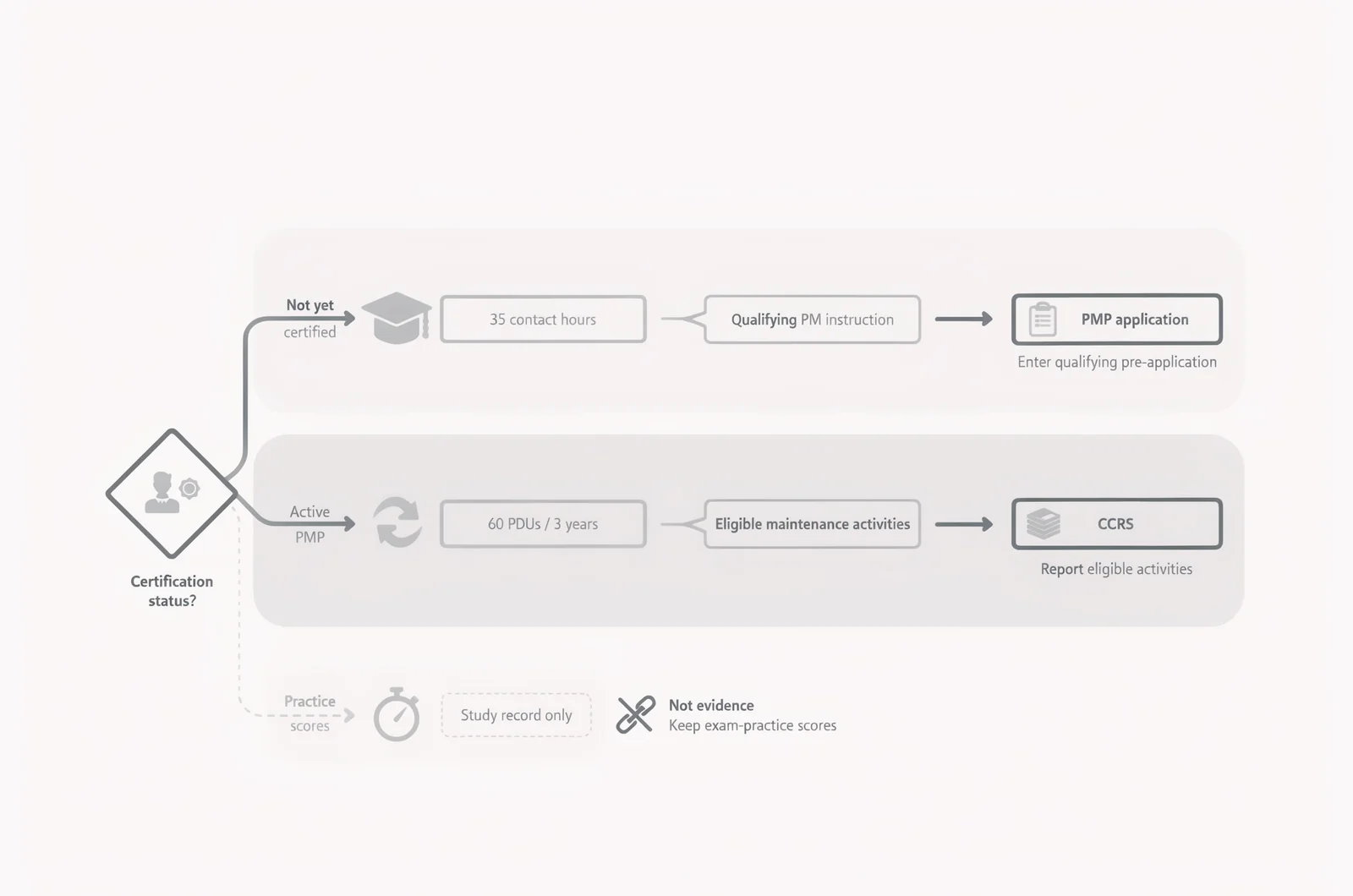
For the standard PMP education route, you need 35 hours of qualifying project management education. Completing those hours satisfies the education component; your application must also meet the other eligibility requirements.
After certification, PMP maintenance follows PMI’s Continuing Certification Requirements program. The standard PMP cycle requires 60 PDUs over three years. Your certification dashboard should show the dates and requirements that apply to your record.
Keep these distinctions clear:
- Enter qualifying pre-application education in the PMP application.
- Report eligible activities for your certification cycle in CCRS.
- Keep exam-practice scores separately from education and renewal evidence.
Have your PMI login, course-completion records, training dates, and documented hours ready before entering anything. For renewal reporting, also have your certification cycle dates and the activity’s eligible category breakdown.
If you already hold CAPM, review the CAPM vs PMP requirements and check how your PMP application handles that credential’s education exemption. Confirm your eligibility route before purchasing another course.
Check what your course actually documents
A course certificate helps establish education hours only when the underlying training meets PMI’s requirements. Read the course details before copying the advertised number into your application.
Separate instruction from other study time
One contact hour represents one hour of qualifying instruction. Count the project management education you completed, excluding breaks and unrelated material.
For example, suppose an employer’s training program contains 20 hours of project management instruction and five hours of general company orientation. The potentially relevant amount is 20 hours. Keep the agenda that supports that distinction.
A broader university course may also require a breakdown. Its full classroom duration does not automatically equal project management education hours.
Independent reading and standalone practice-question sessions do not establish formal education hours. Exam Dumpster’s PMP practice questions can help you identify weak topics, but a practice score does not replace evidence of qualifying instruction.
Confirm the format and completion requirements
Check PMI’s current rules for the course’s delivery method and completion date, particularly for instructor-led training. Provider eligibility requirements can change, so an old advertisement alone is insufficient confirmation.
For self-paced education, confirm that the course includes the assessment required for that format and that you have completed it. Enrollment and access to lessons do not prove completion.
Ask the provider to clarify any certificate that omits instructional hours, completion dates, or the course title. Save its written explanation alongside the certificate.
A useful hours calculator would total eligible instruction across courses, exclude breaks, and flag missing completion records before showing progress toward 35 hours.
Enter completed education in your PMP application
Record your education in the application’s project management education area. Screen labels can change; use the section intended for eligibility training rather than the CCRS activity-reporting form.
1. Match the provider and course details
Enter the training provider and course title as they appear on your completion record. Consistent names make the entry easier to reconcile with supporting documents.
If the provider uses a trading name on its website and a different legal name on certificates, preserve documentation connecting the two. Avoid shortening a title so much that it becomes difficult to identify.
After saving the entry, compare the displayed provider and course names with the certificate. Correct spelling errors and missing details before adding another course.
2. Record completion dates and eligible hours
Use the dates supported by your training records. For an on-demand course, distinguish the purchase date from the period when you completed the education.
Enter the qualifying hours rather than the course’s advertised duration if only part of it meets the requirement. Keep the calculation behind any adjusted figure.
You can combine qualifying education from multiple courses. Hypothetically, one completed course could contribute 20 hours and another 15, for a total of 35.
Record separate courses separately when the application allows it. That preserves the connection between each entry and its certificate.
Check that every claimed hour was completed by application submission. Planned training belongs in your study schedule until you finish it.
3. Review the saved education total
Add the hours independently, then compare your calculation with the application’s total. This catches duplicate entries and simple transcription errors.
A certificate showing 35 hours should correspond to a 35-hour entry only when all those hours qualify. If several certificates cover modules within one larger program, check whether the final certificate already includes them.
Resolve unsupported figures before submitting the application’s accuracy declaration. Save a copy of the completed application or its available summary for your records.
Use the PMP application audit checks to review your documentation. Complete records help you respond if selected for an audit; they do not prevent selection.
Keep evidence that explains every claimed hour
Your application records the education claim. Supporting documents should explain where that claim came from.
Create a folder for each course and retain:
- The completion certificate showing your name and course details.
- The documented instructional hours and completion date.
- A syllabus or agenda showing the project management content.
- Assessment-completion evidence when relevant to the delivery format.
- Provider correspondence clarifying names, dates, or eligible hours.
A payment receipt can support a purchase record, but it does not establish that you completed the training. Keep it alongside completion evidence rather than using it as the main proof.
Make sure downloaded documents are readable and identify you correctly. If your certificate uses a previous name, retain the supporting information needed to explain the difference.
Follow the document requests and submission instructions in your own PMI audit workflow if selected. Do not assume that uploading a certificate somewhere else in your PMI account satisfies an application audit request.
Before leaving this task, open each saved file and verify that it contains the information you expect.
Open your CCRS record after certification
PDU reporting starts with your earned credential and its certification cycle. A submitted application, an exam appointment, or a provisional result does not establish the cycle dates you should use.
Sign in through the PMI account associated with your certification and open CCRS. Confirm that the correct credential appears.
Check the certification start date, cycle end date, and required PDU total. If the credential is missing or the dates appear wrong, resolve the account issue before reporting activities against an assumed cycle.
For PMP, the standard requirement is 60 PDUs per three-year cycle. Other PMI certifications can have different requirements, so use the dashboard for the credential you are maintaining.
Create a separate folder for renewal evidence. Record each activity’s title, provider, completion date, duration, and reporting status.
You do not need to transfer your application’s education entries into CCRS merely because you have passed the exam. Pre-certification education used for eligibility does not become renewal credit for the new PMP cycle.
Check whether a provider has already reported an eligible activity before entering it yourself.
Report PDUs and check where they count
Each PDU claim needs an eligible activity, the correct dates, and an appropriate category. Reporting a large total does not necessarily satisfy the distribution requirements.
1. Find the activity or enter its details
Open the PDU-reporting area in CCRS. Search for the provider or activity when a corresponding listing is available.
Match the actual course or event you completed. Similar titles may represent different durations, editions, or category allocations.
For an activity entered manually, use your records to complete the requested details. Include enough information to identify what you learned and when you completed it.
Check the activity date against your certification cycle. Save the completion evidence in your renewal folder, then review the claim before submitting it.
2. Allocate education across the Talent Triangle
PMI’s Education PDUs use three Talent Triangle areas: Ways of Working, Power Skills, and Business Acumen.
The standard PMP renewal structure requires at least 35 Education PDUs, including at least eight in each area. Confirm the requirements shown for your certification cycle.
Those 35 Education PDUs are separate from the 35 education hours used for PMP eligibility. The matching numbers describe different requirements at different stages.
Use the provider’s documented allocation when applicable. If you must allocate an activity yourself, base the split on the actual learning content.
For example, a hypothetical three-hour activity might support two PDUs in Ways of Working and one in Power Skills. The allocation totals three. Entering three in both areas would overstate the activity.
Check both the activity total and the category split before submitting.
3. Review accepted credits and remaining requirements
After submission, inspect the activity’s status and your dashboard totals. A submitted claim may still require review before it contributes to the completed requirement.
PMP allows up to 25 PDUs from eligible Giving Back activities within the standard cycle. Giving Back is optional; you can complete the cycle through Education activities.
A dashboard showing 35 accepted Education PDUs still leaves 25 PDUs toward the overall requirement. Meeting the category minimums and reaching the full total are separate checks.
If a claim is rejected or adjusted, read the explanation before resubmitting. Correct the category, dates, duration, or supporting information as appropriate.
Record the accepted amount in your tracking file. Once the PDU requirements are satisfied, follow the renewal process shown in your PMI account; reporting credits alone does not complete every renewal step.
Resolve unclear certificates and overlapping claims
Course labels often create more confusion than the reporting forms. Use the activity’s purpose, timing, and evidence to decide how to handle it.
Can a course advertised as 35 PDUs satisfy PMP education?
Possibly, if the underlying course meets the PMP application’s education requirements. The advertising label alone does not establish eligibility.
Check the instructional content, delivery format, completion requirements, and documented hours. Ask the provider for a certificate suitable for documenting PMP application education.
Enter the qualifying education in the application. Creating a CCRS claim does not satisfy the application’s education field.
Can older training count toward the application?
Older training may qualify when its content, format, and records meet the applicable requirements. Check PMI’s current rules before assuming you must replace it.
Locate the certificate and syllabus first. If you cannot establish the hours or completion, request confirmation from the provider before claiming them.
Can the same pre-exam course renew my new PMP?
Training completed before earning the PMP does not become PDU credit for that credential’s new cycle. Keep the completion date attached to the record.
A course available to both candidates and credential holders can serve different purposes for different learners. Your credential status and the activity date determine how it applies to your record.
Can reading count after certification?
Eligible self-directed learning can count toward Education PDUs under PMI’s reporting rules. That does not make independent reading formal contact-hour education for a PMP application.
For a renewal claim, record the learning resource, relevant subject matter, date, and time spent. Retain enough detail to explain the claim if asked.
What if the provider already reported my PDUs?
Check the existing CCRS entry before submitting another claim. Match its activity title, date, and credited amount to your completion record.
If the entry is accurate, record it as already reported in your tracker. Follow PMI’s correction process if a duplicate appears.
Keep exam practice separate from eligibility paperwork
Once your education is documented, maintain a study record with practice scores, difficult topics, and explanations you need to revisit.
Exam Dumpster’s PMP 2026 sample questions can support that practice record. Check that the question set matches the published exam outline for your scheduled exam.
Use study sessions to identify gaps, then return to the relevant lessons. Keep timed practice results in the same study record so you can compare attempts without confusing them with training-completion evidence.
Before closing your paperwork session, make two checks: each application education entry should have supporting completion records, and each renewal claim should match an eligible activity in the correct cycle. Store the application and renewal folders separately, with dates visible in their filenames.
Continue from application to exam day
Open a free sample set for their exam code, then create a free account to unlock the rest and save progress Get started |  |