Leitner System Flashcard Apps Worth Using for Certification Study
By ExamDumpster Editorial Team· (updated Nov 10, 2026)

A workable Leitner system flashcards certification study schedule needs to fit the time you actually have after work. Your app should make due reviews easy to find, return missed material to frequent practice, and leave enough time for explanations and hands-on work.
The useful choices fall into four groups: dedicated Leitner apps, Anki-style spaced repetition, a spreadsheet you control, and flashcards inside an exam-practice platform. Each suits a different study habit. Choose around your review rules, budget, and devices before committing a whole certification deck to one tool.
Choose the review rules before the app
For certification study, start by deciding what counts as a successful recall and when that card should return.
In the five-box workflow used here, new cards begin in Box 1. A correct answer moves a card forward one box. A missed answer returns it to Box 1. Higher boxes have longer review intervals.
An adaptive spaced-repetition app may calculate due dates differently. It can still suit your study plan, but check its scheduling controls before assuming it reproduces those box rules.
Use four questions to narrow your choices:
- Can you inspect the review intervals and see what happens after a wrong answer?
- Can you bring in your own cards, preserve objective labels, and export your work?
- Can you resume on your actual study devices without losing answers or progress?
- What does the complete setup cost, including any mobile app, subscription, or required upgrade?
For portability, build a small trial deck before importing everything. Include a short answer, a longer explanation, an objective label, and any image your study material requires. Confirm that all four survive the move.
Current standalone-app prices, import formats, and device support are unverified in this guide. The recommendations therefore focus on workflows and purchase checks. Dedicated-app brands without substantiated capabilities are omitted.
Four app workflows to consider
The strongest choice depends on how much scheduling control you want and how much maintenance you will tolerate.
A dedicated Leitner app for visible box movement
Choose this category if seeing cards advance through boxes helps you keep track of progress. Its main attraction is a direct relationship between your answer, the card’s box, and its next review.
Make that relationship the acceptance test. In a trial deck, answer one card correctly and another incorrectly. Check their destination boxes and due dates. Then leave a review overdue and inspect how the app presents it.
For cost, check whether interval editing, additional decks, export, or another device requires payment. A free download alone does not establish the cost of your intended setup.
The limitation is uncertainty between products. A Leitner label gives you too little information about reset rules, scheduling, or portability.
This workflow earns its place when you want a literal box system. Commit your deck only after the trial demonstrates the exact promotion and reset behavior you need.
Anki-style spaced repetition for a growing review queue
Consider an Anki-style app if your priority is a scheduled recall queue and you are comfortable with reviews determined by a scheduler.
The fit is strongest when you want to spend each session answering due cards without manually choosing boxes. For certification study, retain objective labels so you can connect a weak card to the material you need to revisit.
Price the exact desktop, browser, and mobile arrangement you intend to use. Current costs and capabilities are not established here, so do not assume every app or device combination works alike.
The main limitation is the difference between adaptive scheduling and a fixed Leitner design. Inspect how the selected app handles missed answers, review limits, and overdue cards.
Choose this route if scheduled recall matters more to you than visible box movement. If five specific intervals are essential, confirm that the available controls can implement them.
A spreadsheet app for direct control
A spreadsheet is a practical option if you already use one and want to define every scheduling rule yourself.
Create columns for prompt, answer, exam objective, box, and next due date. Filter for cards due today or earlier. After answering, update the box and calculate the next date from your chosen interval.
The standout benefit is transparency: every card’s status is visible. The evidence for suitability is the proposed design itself, which you can inspect before moving beyond a small deck.
Cost depends on the spreadsheet software you use. Begin with an existing tool rather than adding another subscription for this workflow.
Its limitation is maintenance. You supply the answer-reveal process, date updates, and safeguards against accidental edits. Cross-device access depends on your chosen software and storage arrangement.
Choose this route when manual control is worth the extra administration. Start with 20 cards and complete several sessions before expanding it.
Exam Dumpster for flashcards alongside practice questions
Exam Dumpster fits later in the decision when you want flashcards beside exam-practice sessions.
Its stated capabilities include study mode, timed mode, answer explanations, and flashcards with progress saved across devices. That makes it a possible companion for turning a practice miss into a smaller recall task.
Access includes free samples, with full access available through individual exam purchases or monthly memberships. Exact prices are not established here; check the cost for your exam and intended access period.
The limitation is specific: configurable Leitner boxes, custom intervals, and deck import are unconfirmed. Saved progress establishes continuity, but it does not establish a five-box scheduler.
This option earns consideration through its stated practice modes and explanations. Use it when keeping question review and flashcards close together reduces study administration. Confirm scheduling controls before relying on it to manage the box system described below.
Set five boxes to fit your exam date
Your certification review intervals should leave time to revisit material before the exam. The following is a proposed starting design for a four- to eight-week study window:
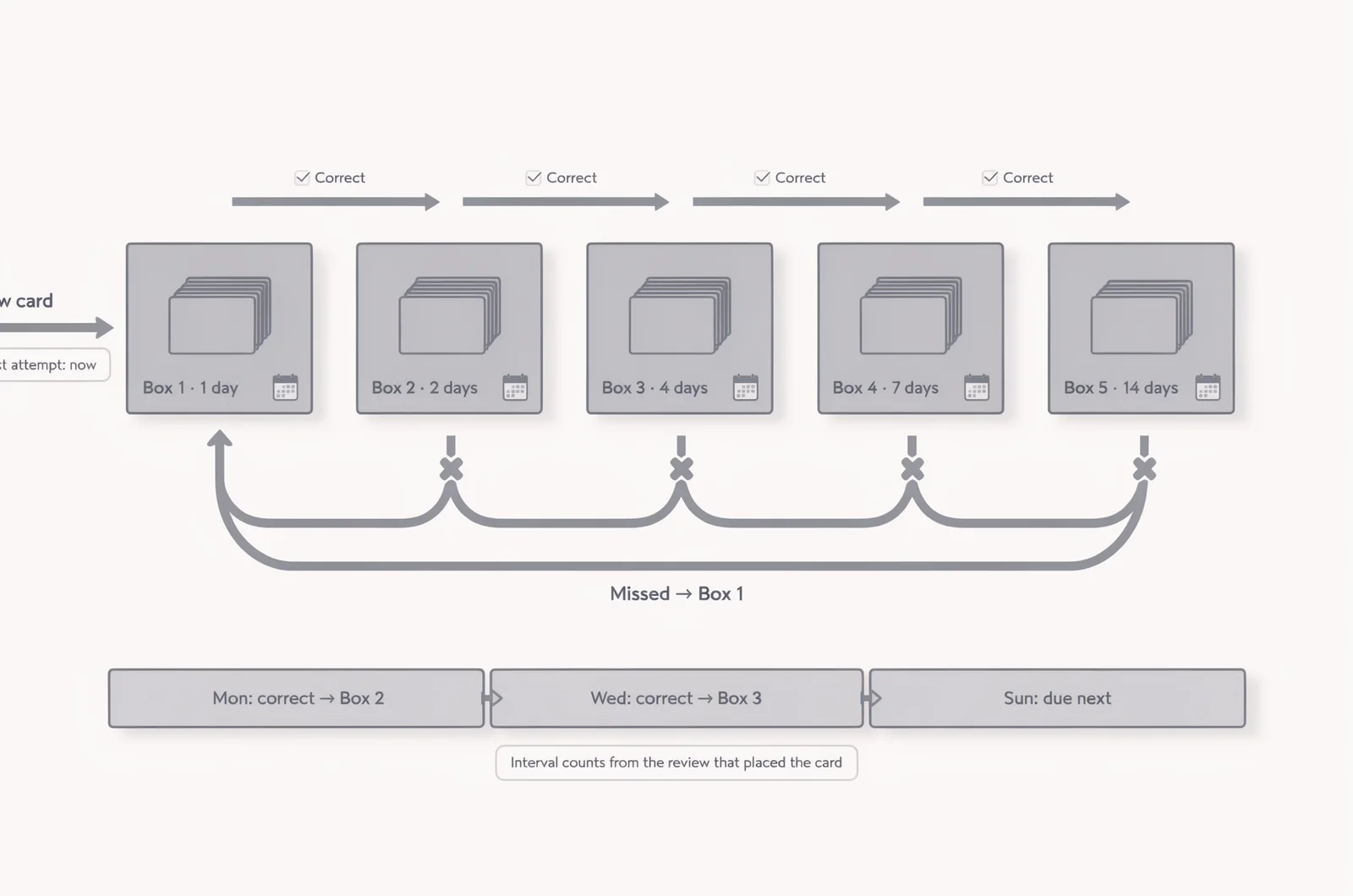
- Box 1 cards return after one day.
- Box 2 cards return after two days.
- Box 3 cards return after four days.
- Box 4 cards return after seven days.
- Box 5 cards return after fourteen days.
Measure each interval from the review that places the card in that box. New cards begin in Box 1 and are ready for their first attempt immediately.
Suppose you answer a new card correctly on Monday. Move it to Box 2 and schedule it for Wednesday. Another correct answer moves it to Box 3, due four days later.
A miss at any stage sends it to Box 1, due the next day. Read the explanation and repair the misunderstanding immediately. Repeating the answer during that same session does not count as another scheduled success under this design.
At Box 5, a correct answer keeps the card there for another fourteen days.
Treat these intervals as adjustable settings. If reviews exceed your available time, pause new cards first. Keep overdue cards visible until you answer them, and inspect cards whose next due date falls after your exam. Use final-week practice to check those topics again.
Build cards from objectives and missed explanations
A certification flashcard deck should preserve the reasoning you need for the exam. Start with the published objectives for the version you intend to sit, then connect each card to an objective or topic.
Keep exam codes and objectives attached
Use separate decks or clear labels for separate exams. For example, keep material from A+ Core 1 questions distinct from material in A+ Core 2 questions.
Record the exam code, objective, and explanation source with each card. When an objective changes, those labels give you a way to find affected material.
An app’s import function only moves content. You still need to check the content against the exam you are preparing for.
Ask for the reason behind the answer
Suppose a practice explanation exposes confusion between two security controls. Create one card asking what distinguishes them, then another asking which requirement would favor one over the other.
Keep the expected response short enough to judge consistently. A correct recall should include the deciding reason.
Avoid prompts that depend on remembering an answer letter or recognizing a familiar screenshot. If a card asks for several unrelated facts, split it. If the underlying concept remains unclear, return to the explanation or relevant lab before adding more cards.
Keep a brief note about why you originally missed the question. That note can reveal whether the problem was vocabulary, a misunderstood requirement, or a gap in practical knowledge.
Make four, six, or eight weeks work after hours
A Leitner schedule needs room for due cards, new learning, and exam-style practice. Pick a study window based on your starting knowledge and the scope of the certification.
Four weeks when much of the material is familiar
Use a four-week plan when an initial diagnostic suggests you already understand much of the content. Reserve flashcards for distinctions, procedures, and recurring mistakes.
During week one, identify weak objectives and build a small deck from those gaps. In weeks two and three, combine due reviews with targeted study and scenario questions. Use week four to revisit persistent weaknesses and complete timed practice.
The SAA-C03 timed drill method is a relevant companion for readers preparing for that exam.
Do not compress an unfamiliar syllabus into this window simply because the calendar has four empty weeks.
Six weeks for a steady evening routine
A six-week plan gives you a clear boundary between building the deck and consolidating it.
As an example, reserve 35 minutes on five workdays:
- Spend 12 minutes answering due cards.
- Spend 15 minutes learning or practicing one weak topic.
- Spend eight minutes writing or repairing cards.
During weeks one through four, introduce up to five cards per study day. That creates a ceiling of 100 new cards across those twenty sessions. It is a planning example, not a required deck size.
Use weeks five and six mainly for reviews, practical work, and fresh questions. Add cards for unresolved mistakes as needed.
Reserve a separate weekend block for longer exercises or timed practice. If due reviews repeatedly exceed twelve minutes, reduce new-card intake and reassess the session budget.
Eight weeks when you need more learning time
Use week one to inspect the objectives, attempt a diagnostic, and choose your workflow. Spend weeks two through five learning material and adding cards gradually.
In weeks six and seven, focus on objectives that remain weak. Use week eight for timed practice, explanation review, and exam logistics.
For shift work, attach the review session to a repeatable event, such as the first quiet period after waking. Keep the sequence consistent even when the clock time changes.
A useful review-budget calculator could multiply cards due by your measured seconds per card and show how many study minutes remain for new material. Measure your pace over several ordinary sessions before setting a daily limit.
Handle overdue cards and readiness doubts
A certification review plan also needs rules for interrupted evenings and uncertain progress. Decide these in advance so a difficult week does not become a deck reset.
What should happen after two missed evenings?
Resume with overdue cards and pause additions until the queue fits your available time again. Work through them within a fixed session.
Under this plan, a card remains overdue until you answer it. After the answer, set its next date using the interval for its destination box.
If the backlog keeps growing, reduce new cards, shorten overloaded prompts, and remove duplicates. Preserve cards that represent distinct gaps.
Should every missed practice question become a card?
Make a card when the miss reveals something worth recalling later: a distinction, a procedure, a requirement, or a recurring misunderstanding.
Some misses need a different response. If you misunderstood the scenario, review its wording and decision process. If you cannot perform a task, schedule practical work.
Before adding a card, write the specific gap it will address. Skip additions that merely duplicate an existing prompt.
Does an empty due queue mean you are ready?
An empty queue means you completed the scheduled reviews. Exam readiness also requires fresh questions, explanations you can defend, and any relevant practical skills.
For AWS preparation, the discussion of AWS practice score targets addresses the separate question of interpreting practice results.
Keep a short list of objectives behind recent mistakes. Use your final study sessions to resolve those gaps and check them with unfamiliar questions.
Exam difficulty and booking plans
Open a free sample set for their exam code, then create a free account to unlock the rest and save progress Get started |  |