How to Schedule Your AZ-104 Exam Through Pearson VUE
By ExamDumpster Editorial Team· (updated Oct 18, 2026)

To set your AZ-104 exam schedule, start in Microsoft Learn, continue to Pearson VUE, choose your delivery method and appointment, and complete checkout. The job is finished when you have a confirmed booking with the correct exam, date, time zone, and delivery details.
This walkthrough covers the checks that belong before payment, including your registration name, identification, online-testing setup, and study commitments. Screen labels and booking conditions can change. Use the requirements, appointment availability, and amounts displayed during your registration rather than relying on an older screenshot or someone else’s booking experience.
Prepare your AZ-104 booking details
An AZ-104 booking goes more smoothly when your account, identification, study plan, and payment details are ready together. Gather the following before opening the scheduler:
- Access to the Microsoft account associated with your Learn profile.
- An email address you can check for booking messages.
- The identification you plan to present, ready to compare with the displayed ID requirements.
- Several possible appointment dates that fit your work schedule.
- A payment method or the details of any exam voucher you intend to use.
- Access to your intended computer and testing location if you are considering online delivery.
Check readiness before choosing a date. Review the exam’s current skills outline and identify topics you still need to practice. A familiar question can feel easy even when the underlying Azure task remains uncertain.
Exam Dumpster’s free AZ-104 sample questions can help identify topics that need another lab session before you pay the exam fee. Read the explanations and note why an incorrect option fails.
A useful interactive booking checklist would ask whether your ID details match, your delivery setup is ready, your study time is reserved, and payment is available. It could flag the unfinished item before checkout.
Keep your possible dates and remaining study tasks together so you can assess an available appointment without rushing.
1. Open the AZ-104 exam page in Microsoft Learn
Start your registration from the AZ-104 exam page in Microsoft Learn. This establishes the exam you intend to book before you move into the appointment process.
Sign in to the account you want associated with your certification activity. If you already have a Learn profile, use it rather than starting another profile because you cannot immediately find the scheduling option.
Open the exam page for AZ-104: Microsoft Azure Administrator. Check the exam code carefully. Related Azure exams can appear alongside preparation resources, certification descriptions, and recommended learning paths.
Review the exam information presented there, including any notices that could affect your intended appointment. Then use the scheduling option and choose Pearson VUE when prompted.
The expected result is a handoff into registration or appointment booking for the same exam. Before proceeding, verify that AZ-104 remains the selected exam.
If the handoff sends you back to sign-in, check which account is active in your browser. Multiple signed-in accounts can make it harder to follow which profile you are using. Return to the exam page with the intended account and repeat the scheduling handoff.
2. Match your registration details to your identification
Your AZ-104 registration details need to agree with the identification requirements for your appointment. Resolve discrepancies before selecting a paid booking.
Review the personal information requested during the registration handoff. Compare your name with the identification you intend to present, paying attention to spelling and the placement of given and family names. Avoid substituting a nickname or preferred abbreviation without checking the applicable rules.
Read the accepted-ID instructions for your chosen delivery method and testing location. Check what they say about:
- Accepted document types.
- Expiration dates.
- Photographs and signatures.
- The number of documents required.
- Name differences and any supporting documentation.
Do not assume that an ID accepted for another exam or another purpose will satisfy this appointment’s requirements.
If a name field is locked or your identification does not fit the instructions, use the account or candidate-support route provided during registration. Explain the mismatch before completing payment.
For accessibility accommodations, review Microsoft’s accommodations process before committing to an appointment. Determine whether your request needs approval or a particular booking route.
You should finish this stage with accurate registration details and a clear understanding of which identification you will present. Keep the relevant appointment instructions available for your final check before exam day.
3. Choose online proctoring or a test center
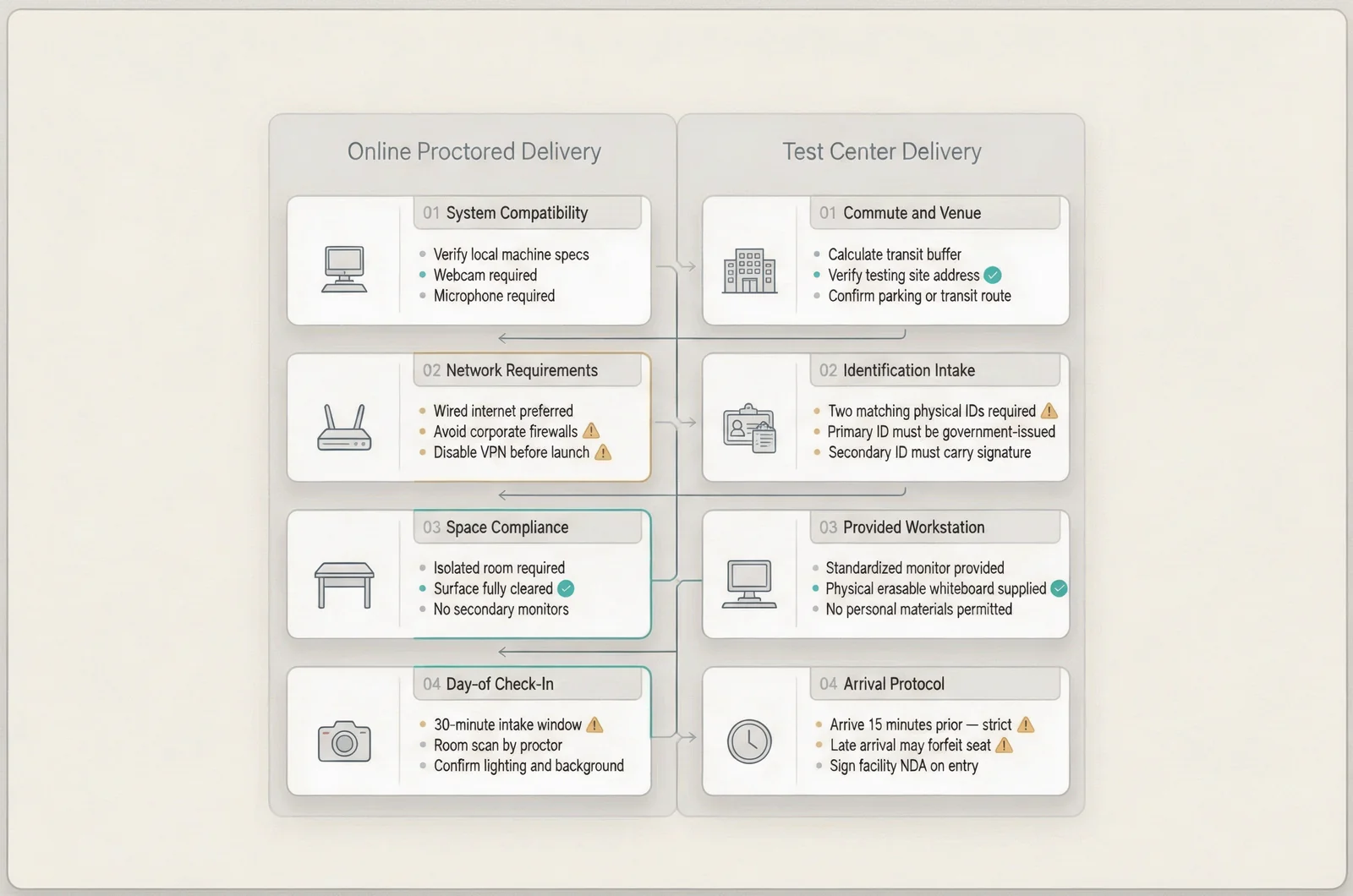
Your AZ-104 delivery choice determines which practical checks belong before booking. Compare the environment you can reliably provide with the travel a test-center appointment would require.
Test your actual setup for online delivery
If you are considering online proctoring, open the online-testing instructions presented during booking and run Pearson VUE’s system test.
Use the computer, network, and location you intend to use on exam day. Testing a personal laptop at home tells you little about a work laptop on an office network.
Follow the current instructions for the operating system, webcam, microphone, network connection, and testing application. Employer-managed devices may have installation restrictions, so establish whether you can complete the required setup before paying.
Review the workspace rules as well. Check the instructions concerning displays, desk items, audio equipment, room access, and check-in photographs. Plan for a private space where you can follow those rules throughout the appointment.
The expected result is a successful system check and a suitable room. If either remains unresolved, address it before choosing online delivery.
Check travel and access for a test center
For a test-center appointment, search the locations available in the booking flow. Review the exact address, available dates, and any location-specific instructions.
Allow for the journey from wherever you will be that day. A center that looks convenient from home may be awkward after a shift elsewhere.
Check building access, parking or transit options, and the arrival instructions supplied for the appointment. Confirm that the selected location is the one you intend to visit.
Choose the delivery method only after you can account for its practical requirements: a working online setup or a workable journey to the selected center.
4. Select the exam language, date, and time
Choose an AZ-104 appointment that fits both your preparation and the rest of your day. An available slot still needs to be workable.
Check the exam language wherever the scheduler presents that choice. Review any separate language information for support or proctoring rather than assuming all language settings are identical.
Browse the available dates for your selected delivery method. If your preferred time is unavailable, consider another date or an alternative test center before rearranging work commitments.
Read the displayed time zone before selecting a slot. Compare it with your local calendar, especially if you are traveling or booking near a daylight-saving change.
Block the full appointment time shown, plus check-in and either travel or technical preparation. Use the appointment instructions to plan that buffer.
Then work backward from the proposed date. Reserve actual study sessions for the topics you still need to review. If you use Exam Dumpster’s AZ-104 practice exams, use explanations and attempt history to decide what those sessions should cover.
Before continuing, verify the exam language, date, start time, time zone, and delivery method on the selection screen.
5. Review the fee and complete checkout
The AZ-104 checkout screen is where you confirm the amount payable for your registration. Review it before submitting payment.
Check the displayed testing country or region, currency, exam charge, and any taxes or adjustments. Use the total shown for your booking when deciding whether the cost fits your budget.
If you have a voucher or discount, enter it where the booking flow permits. Read its conditions and check the resulting total. Entering a code does not establish that it has been accepted.
For an employer-funded appointment, confirm what documentation you need for reimbursement. Save the appropriate receipt after checkout rather than assuming an appointment email contains every billing detail.
Before paying, read the cancellation and rescheduling conditions presented for the appointment. Record the applicable deadline and how it is expressed. Keep any voucher-specific restrictions with those notes.
Make one final check of the exam code, candidate details, language, delivery method, and appointment time. Then submit payment or complete the voucher-funded checkout.
The expected result is an order or appointment confirmation. If the page reports an error or stops responding, inspect your appointment and payment status before submitting again. A failed page load leaves uncertainty about the transaction; resolve that uncertainty before making another attempt.
6. Verify the confirmed appointment
A confirmed AZ-104 appointment gives you a record you can check independently of the checkout screen. Verify that record before closing your booking session.
Review the confirmation page and any booking email. Save the appointment or order reference where you can find it without searching through your study notes.
Confirm that the record contains the correct:
- Exam code and exam name.
- Candidate name.
- Exam language.
- Appointment date and start time.
- Time zone.
- Online-delivery details or test-center address.
- Instructions for accessing or managing the appointment.
Check the appointment in your account as well, using the management route supplied during booking. If the record and email disagree, resolve the difference through the support options attached to the booking.
Add the appointment to your calendar manually if necessary. Preserve the time zone and location information when doing so. A calendar entry with only “Azure exam” and a start time leaves too much to reconstruct later.
Save the payment receipt separately if you need it for reimbursement. Finally, note when you need to review check-in instructions and any deadline for changing the appointment.
Your success check is a confirmed booking whose exam, candidate, time, and delivery details all match your plan.
Resolve booking problems before submitting another payment
AZ-104 booking problems need different responses depending on whether the issue concerns availability, account details, or checkout. Identify the failed stage before repeating the process.
When a preferred appointment disappears
Return to the available appointment choices and review the alternatives. Until the booking is confirmed, avoid treating a selected slot as a completed reservation.
Check another date, nearby center, or suitable delivery method. Repeat the language and time-zone checks whenever you change the selection.
When your voucher or payment does not work
Read the error message and compare it with the details you entered. For a voucher, inspect its exam eligibility, validity period, and other stated restrictions.
For a payment problem, review the transaction status through the booking flow and your payment provider. A pending charge alone leaves the appointment status unresolved.
Keep the error text and any transaction reference for support. Avoid sending full payment credentials through an ordinary support message.
When confirmation is missing
Check your account’s appointment record and the email address used during registration. Look in spam or filtered folders for the booking message.
If payment appears to have completed but no appointment is confirmed, contact the support channel identified in the booking process. Provide the exam code, approximate transaction time, and available reference number. Wait until you understand the original transaction before purchasing another appointment.
Questions about your AZ-104 appointment
The remaining AZ-104 scheduling questions usually concern timing, cost, or changing plans. Use your appointment’s displayed terms for decisions that depend on policy or availability.
Where can I see the dates available to me?
Use the Pearson VUE booking flow reached from Microsoft Learn. Review availability for the delivery method and location you actually intend to use.
An old appointment screenshot or another candidate’s experience cannot establish which slots you can select during your registration.
Can I change my appointment after booking?
Check the appointment-management options and the rescheduling conditions supplied with your confirmation. Review the deadline, any charges, and the effect of voucher restrictions before making a change.
After submitting a change, verify the replacement confirmation. Update your calendar only when the new appointment details are confirmed.
What amount should I budget for the booking?
Use the checkout total for your registration. Include any travel, parking, or other direct costs associated with your selected delivery method.
If an employer will reimburse the fee, check which receipt details the expense process requires before checkout.
Should I book while I still have topics to study?
Choose a date only when you can assign realistic study sessions to the remaining work. Count the evenings or days you can actually use, then allow room for a disrupted session.
If your plan depends on uninterrupted study after every shift, revise it before paying. Keep the remaining tasks specific enough to finish in the time you have reserved.
Azure foundations for administrator study
Open a free sample set for their exam code, then create a free account to unlock the rest and save progress Get started |  |