Network+ Performance-Based Questions and the Labs That Prepare You
By ExamDumpster Editorial Team· (updated Nov 19, 2026)
A useful CompTIA performance-based questions strategy starts with a task you can perform and a result you can explain. For Network+ preparation, that means practicing how to interpret a topology, check addressing, investigate connectivity, and verify a change. If your study time comes after work, each lab needs a clear purpose. This guide compares five practice formats, explains what to look for before spending money, and gives you a repeatable approach for working through a performance-based question, or PBQ.
Choose labs by the networking task you need to perform
Choose Network+ practice resources by the work they let you complete. A useful resource gives you a starting configuration, a clear requirement, and enough feedback to explain the result.
Use N10-009 as this guide’s study scope, and match resources to the exam code on your booking. Check their stated coverage against the published objectives. A networking label alone gives you little evidence of exam fit.
The recommendations below compare practice formats. Specific provider prices, availability, and version coverage are unverified, so the cost signals describe what you would need to supply.
| Practice format | Tasks to look for | Cost consideration | Setup effort |
|---|---|---|---|
| Topology simulator | Addressing, VLANs, connectivity faults | Check software access and any separate lab fee | Build or load a small topology |
| Host CLI sandbox | Interface checks, routes, DNS diagnosis | An existing suitable computer may be enough | Prepare an isolated practice environment |
| Subnetting drills | Network boundaries and host allocation | Paper exercises need no separate subscription | Minimal |
| Packet-analysis exercises | DNS exchanges and connection troubleshooting | Check software requirements and capture access | Learn capture navigation |
| PBQ-style scenario sets | Reading requirements and completing linked tasks | Inspect samples before buying access | Usually lighter than building a lab |
Choose a resource whose sample explains both the action and the verification. A completed diagram without reasoning is weak feedback.
Five lab formats that build useful Network+ habits
These formats earn their place through different practice outcomes. Their value depends on the exercises you can complete, the explanations available afterward, and the time required to resume a session.
Topology simulators for addressing and VLAN faults
A topology simulator fits learners who understand individual networking terms but struggle to follow traffic across several devices. Look for exercises where you can inspect connections, change settings, and check the result.
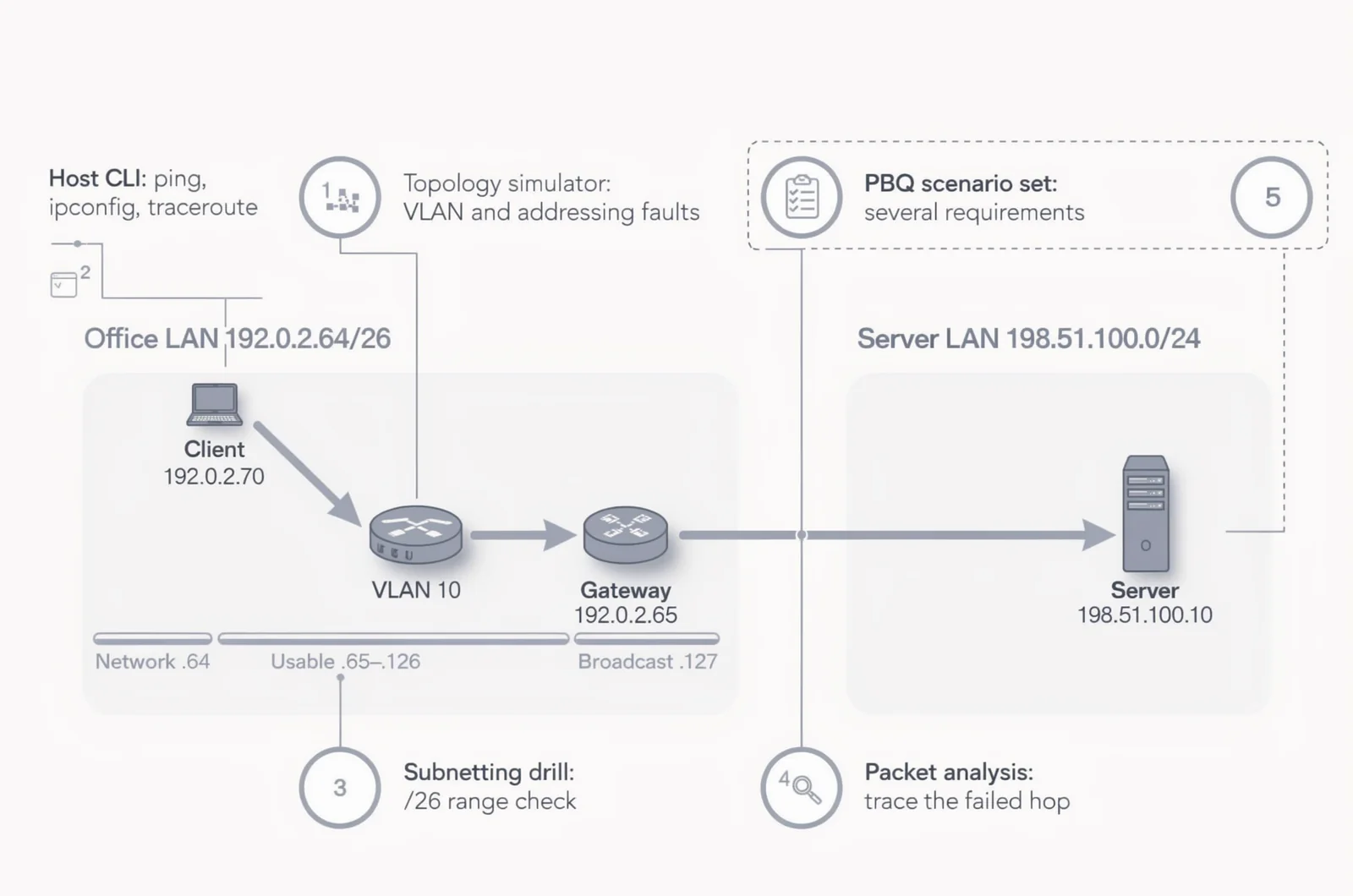
For one hypothetical office exercise, place a client in the 192.0.2.64/26 network and use 192.0.2.65 as its gateway. Add a server on a separate network. Introduce one fault, such as an incorrect client mask, then investigate it without opening the solution.
A Packet Tracer-style environment is worth considering if its supported functions let you build that exercise. Software access and ready-made exercise packs may have separate costs. Building your own topology also consumes study time.
The useful evidence is whether the client reaches the intended destination and whether you can explain the path. Simulator behavior and command support can differ from other environments, so avoid treating one interface as a prediction of the exam.
Choose this format when your weak point is understanding how devices and settings work together. Save a working baseline before introducing faults.
Host CLI sandboxes for choosing the right diagnostic command
A command-line sandbox fits learners who recognize commands on a flashcard but hesitate when selecting one during troubleshooting. Use an isolated practice machine or virtual environment where you can inspect settings safely.
Build a short investigation around the office scenario. Check the client’s address and gateway, inspect its routing information, test reachability, and examine a DNS lookup. Depending on the operating system, exercises might use ipconfig, ip, ping, tracert, traceroute, nslookup, or dig.
Command availability and syntax vary by environment. Select a sandbox that explains the output you will actually see.
An existing suitable computer may keep additional spending low. Virtual machines add setup work, while a prepared environment may reduce it. Decide how much of your evening you can spend maintaining the lab.
The completion evidence should be a short diagnosis supported by relevant output. This format earns its place when command selection is your bottleneck. Save the starting state and write down the command that would confirm each suspected fault.
Subnetting drills for reliable address decisions
Subnetting drills fit candidates who understand the process but lose time checking boundaries. Paper exercises are enough to begin; a calculator can check completed work afterward.
Continue the same hypothetical office exercise. For 192.0.2.64/26, identify the network address, usable host range, and broadcast address before assigning devices. The usable range is 192.0.2.65 through 192.0.2.126, and the broadcast address is 192.0.2.127.
Then explain why an address inside that range belongs to the subnet. That explanation makes the exercise useful beyond memorizing a sequence of block sizes.
There is little setup overhead, and you can create fresh exercises without purchasing another course. The limitation is scope: correct subnet arithmetic does not establish whether switching, routing, or name resolution works.
A useful interactive companion would accept a network and host requirement, then reveal the worked calculation after submission. Treat that as a study-tool idea rather than a product recommendation.
Choose these drills when address calculations interrupt longer scenarios. Finish each exercise by checking the proposed host and gateway against the subnet boundary.
Packet-analysis exercises for following a failed connection
Packet-analysis practice fits learners who need help connecting symptoms with network exchanges. Choose exercises with a supplied capture, a precise question, and an explanation of the relevant packets.
For the office scenario, investigate what happens when the client tries to reach the server by name. An exercise could ask you to locate the DNS request, identify the response, and then examine the attempted connection.
The strongest teaching feature is an annotated explanation that connects packet details to the scenario. A large capture with an answer at the end gives you less guidance.
Check software requirements and capture-file access before choosing a resource. Installation may be straightforward, but learning filters and navigation adds overhead to the first session.
A capture only shows traffic visible at its collection point. Practice distinguishing what the evidence supports from what remains unknown.
Choose this format when you can recite protocol functions but struggle to explain a failed exchange. Finish with one supported finding and one additional check that would narrow the diagnosis.
PBQ-style scenario sets for handling several requirements
Scenario sets fit learners who can complete isolated tasks but lose track when a prompt combines a diagram, several settings, and an operational requirement.
Look for original practice scenarios with clear instructions and detailed solutions. Useful feedback explains why each action satisfies a requirement and what would verify success. Inspect a sample before paying for a larger bank.
A suitable exercise might combine client addressing, service selection, and a connectivity fault. Keep its requirements visible while you work. Check each requested outcome before reading the explanation.
Setup effort can be lower than building a network, but the interaction matters. A static diagram and an interactive simulation give you different kinds of practice. Confirm which one you are purchasing.
The evidence of value is the quality of the worked solution and your ability to explain a fresh attempt. Repeated exposure can make an answer feel familiar.
Choose scenario sets after you can perform the component tasks. Change the addresses or fault, then attempt the exercise again without the answer nearby.
Rehearse a PBQ approach that protects your time
A repeatable PBQ approach helps you turn an unfamiliar Network+ scenario into a sequence of manageable decisions. Practice the sequence during labs so you can use it without inventing a new method under time pressure.
Translate the prompt into observable outcomes
Start by identifying the requested result. Does the client need access to a server? Must a connection be restricted? Are you assigning valid addresses?
Then identify constraints, such as retaining an existing gateway or changing only specified fields. Keep required outcomes separate from background details.
For each outcome, decide what evidence would demonstrate completion. This prevents a plausible-looking configuration from becoming your only success check.
Inspect evidence before changing settings
Read the diagram, available output, and current configuration. Form a specific hypothesis, then inspect the setting most relevant to it.
During practice, change one suspected cause at a time when the exercise permits. Record what changed and whether the result supports your diagnosis.
If the interface behaves differently from your lab software, use the task instructions to determine the available actions.
Check every requested result before moving on
Use this short completion sequence:
- Revisit each requirement in the prompt.
- Check that entered values belong to the intended device or interface.
- Use any available verification method.
- Check for an untouched field or unfinished subtask.
- Decide whether another attempt is worth the remaining time.
During timed practice, record when useful progress stops. Use that pattern to set a personal revisit rule rather than guessing how long every task deserves.
Build a lab rotation around four evenings
A short Network+ lab rotation can cover several skills without requiring a new platform every night. The following is a suggested schedule; adjust it around your shifts and weaker topics.
On the first evening, spend about 30 minutes building or reviewing the office topology. Confirm its working state, introduce one addressing fault, and diagnose it.
Use the second evening for subnetting and host commands. Calculate a proposed address range, inspect the client’s configuration, and explain the next diagnostic command before running it.
On the third evening, follow one failed connection through a packet exercise. Keep the task narrow enough to finish with a supported finding.
Reserve the fourth evening for a timed scenario and a written review. Record whether the difficulty came from missing knowledge, misreading the prompt, or navigating the interface.
For port numbers and other recall facts, a spaced-review routine can sit between lab sessions. The guide to Leitner flashcard apps explains a related study approach.
Keep the topology file, fault notes, and last unfinished task together. End each session by writing the exact action you will resume.
Use question explanations to check your lab reasoning
Explained questions can expose gaps in a Network+ lab diagnosis. After repairing a fault, answer a related question and explain why the other choices fail in that situation.
Exam Dumpster is one later option for Network+ N10-009 sample questions. Its question explanations can support review alongside practical exercises. Check the sample format before deciding whether it addresses your particular weak area.
For every missed question, write a brief correction: the clue you overlooked, the principle involved, and the lab action that would test your understanding.
For example, if you confused a name-resolution problem with an addressing problem, return to the office scenario. Explain how you would distinguish them using the available evidence.
Keep a correct answer in proportion. A useful readiness check is whether you can explain the decision, perform the relevant action, and verify its effect on a fresh exercise.
PBQ timing, exam versions, and readiness
Network+ preparation raises practical questions that a resource list alone cannot settle. Use the answers below to make study decisions without assuming every practice interface reproduces an exam task.
Should every PBQ wait until the end?
Use a timing approach you have rehearsed. During practice, note which tasks you can complete efficiently and which absorb time without useful progress.
On exam day, follow the available instructions and navigation rules. If returning to a task is permitted, make that decision according to your remaining time and progress. A blanket skip rule can distract you from an approachable task.
Can a practice resource establish how partial credit works?
A practice resource’s scoring describes its own exercise. Use vendor guidance to understand official scoring policies; avoid projecting a practice bank’s points onto the real exam.
During preparation, complete every requirement you understand and verify the work you can check. Do not build your timing plan around an assumed partial-credit formula.
How can you check whether older labs are still useful?
Compare each exercise with the objectives for your booked exam code. Keep tasks that support those objectives and identify any gaps that need separate work.
An older exercise may still teach a networking concept, but its title alone cannot establish N10-009 coverage. Check the actual task, supported functions, and explanation.
Can these exercises support A+ or Security+ study?
Some underlying skills can transfer, while the required depth and task scope differ. Match reused exercises to the objectives of the exam you are preparing for.
If either exam is already part of your plan, A+ Core 1 questions or Security+ SY0-701 practice questions can provide separate question practice. Maintain an objective checklist for each code.
Explore the next level of networking study
Open a free sample set for their exam code, then create a free account to unlock the rest and save progress Get started |  |