AWS ESL Extra 30 Minutes: 7 Rules Before You Book Your Exam
By ExamDumpster Editorial Team· (updated Nov 12, 2026)

The AWS exam ESL extra 30 minutes accommodation gives eligible non-native English speakers additional time when taking an AWS Certification exam in English. Request it through your AWS Certification account before scheduling. Approval added afterward does not automatically extend an appointment you already booked.
That order matters when you have arranged time off, paid for an exam, or planned your final study week around a particular date.
These seven rules follow the booking decisions with the biggest consequences: eligibility first, approval before scheduling, then confirmation of your appointment and practice pace. Work through the booking checks before committing to a date. Use the current instructions in your AWS Certification account to resolve any differences in screen labels or scheduling options.
1. Check your first language and your exam language
ESL +30 is intended for candidates whose first language is not English and who take their AWS Certification exam in English. Those two conditions belong together.
Start by separating your language background from your confidence with the material. Finding an architecture scenario difficult does not establish ESL eligibility. Neither does wanting more time to review answers.
Your country of residence is a separate detail. A candidate living in the United States may have learned another language first. Working in English every day also does not necessarily make English that person’s first language.
Before requesting the accommodation, check:
- Whether English is your first language.
- Whether you intend to sit the exam in English.
- Whether the request you are selecting matches that language need.
This rule matters most if you are choosing between an English exam and an available translated version. Extra reading time and a different exam language address different needs. Choose the language in which you can interpret technical requirements most reliably.
The accommodation adds time. It does not translate questions, explain unfamiliar wording, or replace preparation for AWS terminology.
If you also need support for a disability or another documented condition, check the separate accommodation process. Do not assume an ESL request includes other adjustments.
Settle the exam language before moving into scheduling, and check that the selected language remains correct on the booking screen.
2. Request approval in your AWS account before scheduling
The ESL request belongs in your AWS Certification account before you create the exam appointment. This is the most useful rule for candidates who have chosen an exam but have not booked it yet.
Start from the certification account rather than opening a standard appointment and expecting to add time later.
The account workflow generally follows this sequence:
- Sign in to your AWS Certification account.
- Open the exam-accommodations area.
- Start an accommodation request.
- Select the ESL +30 MINUTES option.
- Submit the request and check its approval status.
Navigation labels can change. Look for the accommodation function and the specific ESL option rather than relying on an old screenshot.
Submission and approval are separate checkpoints. Before scheduling, confirm that the request appears as approved in the account you will use for the exam.
Keep a record of that status. A saved confirmation can help you describe a problem if the later appointment does not show the expected time. It does not replace checking the appointment itself.
If you have more than one login or an older certification profile, confirm that you are using the account connected to your exam history.
There is little benefit in rushing past this stage to secure a date. Complete the approval check first, then enter the scheduling workflow from the same certification account.
3. Treat an existing booking as a separate problem
An ESL approval does not automatically update an AWS exam appointment that was scheduled without it. This rule deserves immediate attention if you already have a confirmation email.
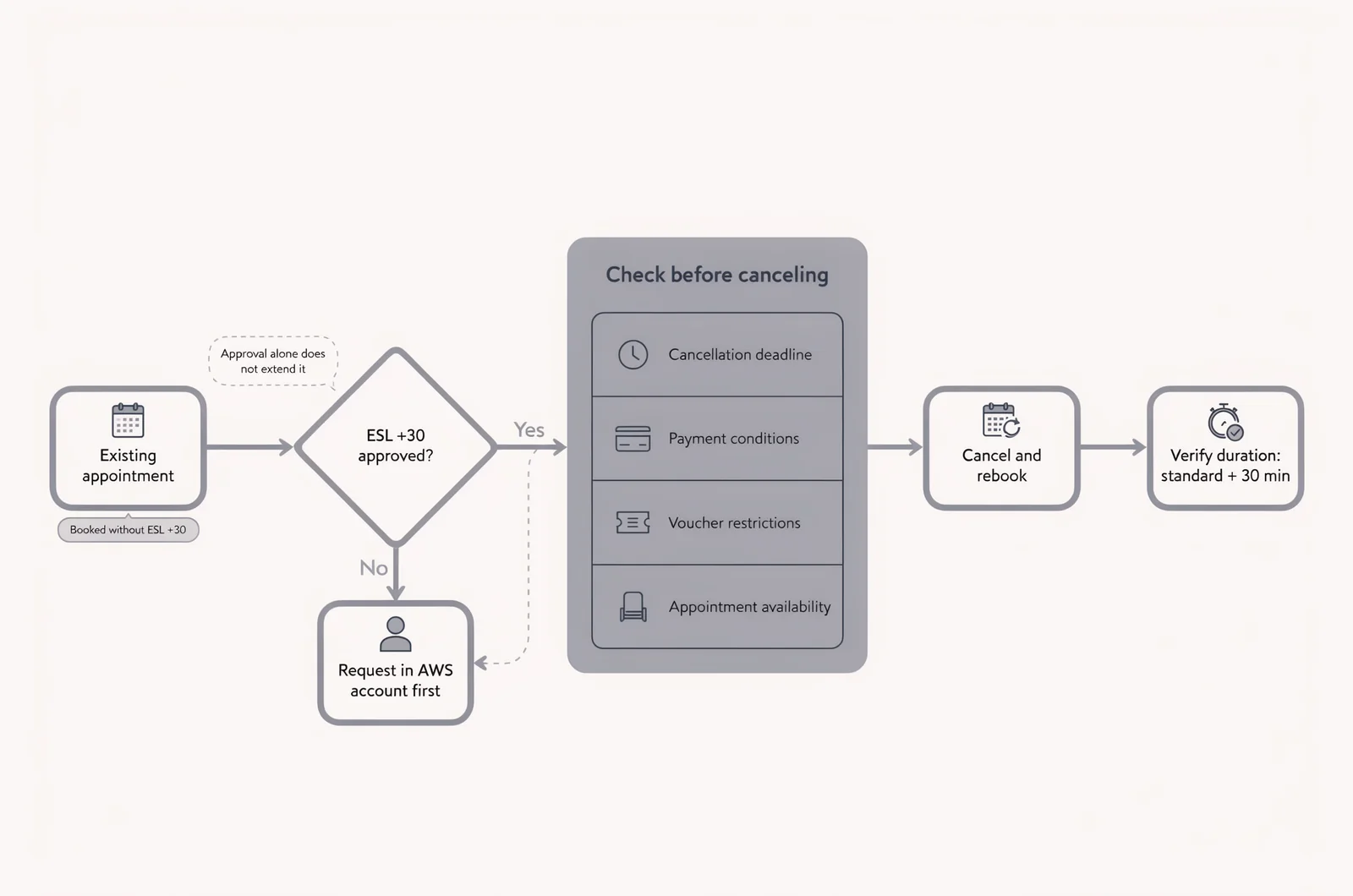
Check the appointment rather than assuming a new account approval has changed its duration.
To attach the accommodation, an appointment booked without it generally needs to be canceled and scheduled again after approval. Before canceling, check the applicable cancellation deadline, payment conditions, and any voucher restrictions.
A replacement booking also depends on appointment availability. Your original date and time may no longer be available when you return to the scheduler.
That makes the sequence important:
- Confirm that the ESL request is approved.
- Review the existing appointment’s change conditions.
- Resolve any payment, voucher, or deadline questions.
- Make the corrected booking and verify its duration.
If the exam is close, contact the support channel shown in your certification or scheduling account before changing it. Explain that the appointment was created before ESL approval. Include the appointment details and the accommodation status.
For the wider budget, the AWS exam fee guide can help you organize the costs to review.
Avoid assuming that a proctor can repair the booking at check-in. Resolve the appointment record before exam day, while there is still time to address scheduling or payment questions.
4. Verify the exam clock, not just the appointment length
An approved request is useful only when the intended appointment includes the additional exam time. Check the scheduled exam details after booking, while any discrepancy is easier to resolve.
The arithmetic is straightforward: ESL +30 adds 30 minutes to the standard answering time for the exam. It is a fixed addition, rather than a percentage increase.
Use the standard duration for your exact exam and version. Do not borrow a duration from a different AWS certification or an older preparation guide.
Compare these details:
- The exam name and code.
- The selected exam language.
- The standard exam duration.
- The accommodated duration shown for your booking.
The total appointment window can include activities outside the question-answering period. Check-in, instructions, and other administrative steps can make appointment information look different from the exam clock you expect.
If a duration is unclear, ask what that figure includes. A long appointment window alone does not establish that ESL +30 has been attached correctly.
This check is especially useful after canceling, changing delivery methods, or making a replacement booking. Read the new confirmation as a fresh appointment.
Save the booking confirmation alongside the accommodation approval. If the expected extension is missing or ambiguous, contact support with both records and ask for confirmation of the time available to answer exam questions.
5. Check the accommodation in your chosen delivery mode
AWS ESL +30 can apply to eligible English-language exams delivered online or at a test center. Choose the environment that suits your circumstances, then verify the accommodation on that specific appointment.
For an online exam, consider your room, equipment, internet connection, and ability to remain undisturbed. An additional half hour also means spending longer in the testing environment.
For a test-center appointment, consider travel, arrival arrangements, and the available session times. If you study around shifts or family responsibilities, include the full visit in your calendar.
The ESL extension changes the allotted exam time. Other delivery requirements still apply. Follow the rules for identification, permitted items, room conditions, communication, and breaks that accompany your booking.
This distinction matters if you need more than language-related reading time. Other accommodations may have separate approval requirements or delivery restrictions. Check each approved adjustment against the mode you intend to use.
If you switch from online delivery to a test center, or the reverse, review the resulting appointment details again. An earlier confirmation describes the earlier booking.
Choose the delivery method based on the environment you can manage reliably. Then check the language, accommodation, and duration together on the final appointment record.
Keep the provider’s check-in instructions available separately so that the extra exam time does not become a reason to overlook arrival or equipment requirements.
6. Understand what carries forward to future bookings
An approved ESL +30 accommodation can carry forward to future eligible English-language AWS exam registrations. You generally do not need to submit the same request again for every exam.
The initial request still matters. Creating a certification account or booking an English exam does not, by itself, establish ESL approval.
This rule is most useful for candidates planning several certifications or returning for another attempt. Check the existing accommodation status before starting a new booking.
Future eligibility also depends on the appointment you create. The exam language must match the accommodation’s conditions, and the booking must include the approved adjustment.
A previous exam with extra time is helpful context, but the new appointment deserves its own check. Confirm the exam code, language, and accommodated duration each time.
If your request is already approved, avoid submitting duplicate requests simply because you are scheduling another exam. First inspect the account and the new appointment. Contact support if the expected accommodation is absent.
Be especially careful when using a different login from the one used previously. An approval recorded under one certification profile should not be assumed to appear in another.
Keep the distinction practical: approval establishes the account-level accommodation; the appointment details establish what has been scheduled for that sitting. Before each exam, verify both records rather than relying on memory of your last booking.
7. Practice with the time you have actually been assigned
Once your appointment includes ESL +30, use its confirmed answering time to plan timed practice. Practicing only at the standard pace can give you an incomplete picture of how you will manage the booked exam.
Extra time is a reading and decision-making allowance. Preparation still needs to reveal whether you understand the services, constraints, and tradeoffs in a question.
Reserve time for a second pass
For a hypothetical practice set with 60 questions and a standard limit of 120 minutes, an additional 30 minutes creates a 150-minute budget.
That is an average of 2.5 minutes per question before reserving review time. If you reserve 15 minutes for a second pass, the first-pass average becomes 2.25 minutes.
This is an illustration, not the specification of a particular AWS exam. Use your own exam’s confirmed duration and question count.
Average pace is a checkpoint. Some questions need a short read; others require comparing several plausible answers. Check progress periodically instead of forcing every question into the same interval.
Separate reading delays from knowledge gaps
After a timed session, review why you spent time on difficult questions. Were you interpreting a condition, recalling a service limit, or deciding between architectures?
Those problems need different study responses. Reading practice helps with interpretation. Reviewing explanations helps expose missing technical understanding.
Exam Dumpster has study mode with answer explanations and timed simulations. These support different parts of that process: explanation review first, then a timed attempt to examine pace and recall.
The guide to AWS practice exam scores can help you interpret results alongside those conditions.
A useful interactive pacing calculator would accept confirmed exam time, question count, and a review reserve, then display progress checkpoints. Keep any calculated pace tied to the duration on your actual booking.
Questions to settle before your AWS appointment
Does living in the United States prevent an ESL request?
Residence alone does not determine whether English is your first language. Check the language conditions for the accommodation and the language selected for your exam. A US address should not replace that eligibility check.
Do I need another ESL request for a retake?
An existing approved accommodation can carry forward to future eligible registrations, including a new appointment after an unsuccessful attempt. Check its status before scheduling, then verify the retake’s duration. Treat the new confirmation as a separate booking record.
Can I ask the proctor to add the half hour?
Arrange the accommodation through the account and booking process before exam day. Do not plan around a proctor changing an appointment that lacks the extension. If the recorded duration is wrong, raise the issue with support before check-in.
Does the extra time include a longer check-in or unrestricted breaks?
Plan check-in separately from the question-answering period. ESL +30 adds exam time; it does not establish different break permissions. Follow the instructions attached to your chosen delivery method, and ask about any separate accommodation you need.
Should I wait until the final study week to request it?
Request the accommodation before scheduling, rather than leaving it as a final-week task. That gives you a confirmed duration for practice and time to resolve a booking discrepancy. Before arranging leave or travel, check the approval and appointment together.
AWS exam fees and practice readiness
- AWS certification exam costs
- Interpreting AWS practice exam scores
- Leitner System Flashcard Apps Worth Using For Certification Study
Open a free sample set for their exam code, then create a free account to unlock the rest and save progress Get started |  |