Correct answer: 4
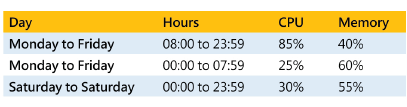
Explanation: Here the scale out condition of “Increase the instance count by one when the CPU percentage is greater than 80% will be met. Hence the number of instances will keep on increasing till the maximum limit. The scale in condition of'Decrease the instance count by one when the Memory percentage is less than 50% will be ignored because you need to have both of the scale in conditions that need to be met. This logic of multiple scale in and scale out conditions is also given in the Microsoft documentation:Considerations for scaling when multiple rules are configured in a profileThere are cases where you may have to set multiple rules in a profile. The following autoscale rules are used by the autoscale engine when multiple rules are set. On scale-out, autoscale runs ifany rule is met. On scale-in, autoscale require all rules to be met.
To illustrate, assume that you have the following four autoscale rules:*lfCPU(30%,scale-in by1•
If Memory ( 50%, scale-in by 1*lfCPU)75%,scale-out by1•
If Memory ) 75%, scale-out by 1Then the follow occurs:•
If CPU is 76% and Memory is 50%, we scale out.•
If CPU is 50% and Memory is 76%, we scale out.
On the other hand, ifCPU is 25% and memory is 51% autoscale does not scale-in. In orderto scale-in, CPU must be 29% and Memory 49%.Since this is clear from the reasoning, all other options are incorrect -- Reference: https://docs.microsoft.com/en-us/azure/azure-monitor/platform/autoscale-best-practices