CCNA Exam Day Rules and What Gets You Turned Away at Check-In
By ExamDumpster Editorial Team· (updated Oct 19, 2026)
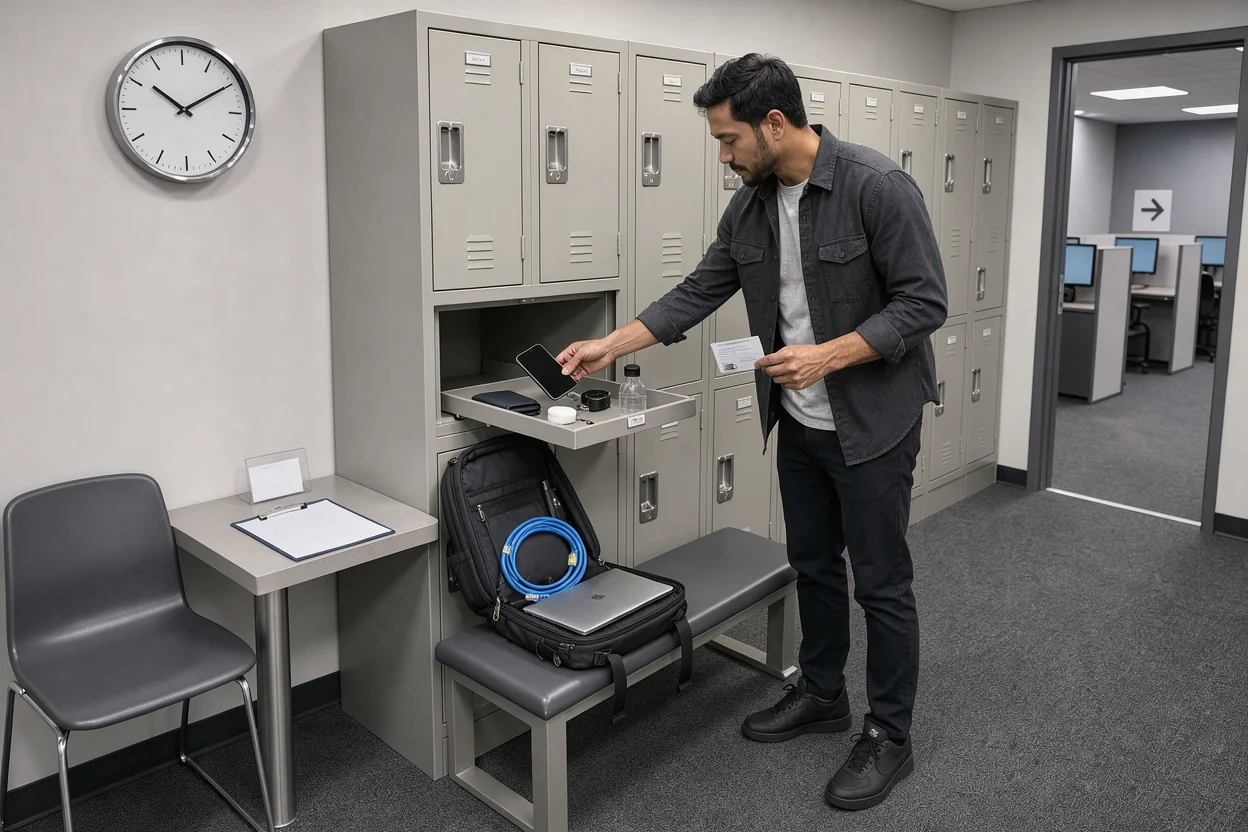
CCNA exam day rules and ID checks deserve attention before your final subnetting review. The practical goal is to reach the correct test center, complete admission with acceptable documents, and start the exam with your personal items properly stored. Work through the sequence below with your appointment confirmation beside you.
This walkthrough covers an in-person Pearson VUE appointment. The accepted ID combination, exact arrival deadline, and any exceptions require confirmation in the current Cisco and Pearson VUE instructions for your booking. Those details are not verified here. Resolve uncertainty before traveling, especially if replacing an ID or correcting your registration will take time.
Match your booking to the CCNA exam you intend to take
Open your latest appointment confirmation and check the exam code, delivery method, date, start time, and address. This prevents a simple booking mistake from becoming a wasted journey.
Read the full test-center address, including the suite and any building-access instructions. A familiar street name is not enough. Check whether your appointment is actually at a center rather than an online session.
If you used Exam Dumpster’s CCNA practice questions, compare the 200-301 code with your booking. Your study history helps identify what you prepared for; the appointment confirmation establishes what you booked.
Keep the following information accessible:
- Your appointment or registration number.
- The registered candidate name.
- The confirmed exam and delivery method.
- The test-center address and arrival instructions.
- The support contact listed in your booking.
Read any messages received after the original confirmation. A rescheduling notice or location update may replace earlier details.
For an appointment after work, check when you can realistically leave your shift. Account for the journey and admission process, rather than planning only around the displayed exam start time. Finish this check with one clear itinerary and the latest confirmation saved where you can retrieve it.
Check your name and ID before you travel
Compare your registration with the documents you plan to present while there is still time to fix a problem. An identity question is easier to resolve before exam morning than at the admission desk.
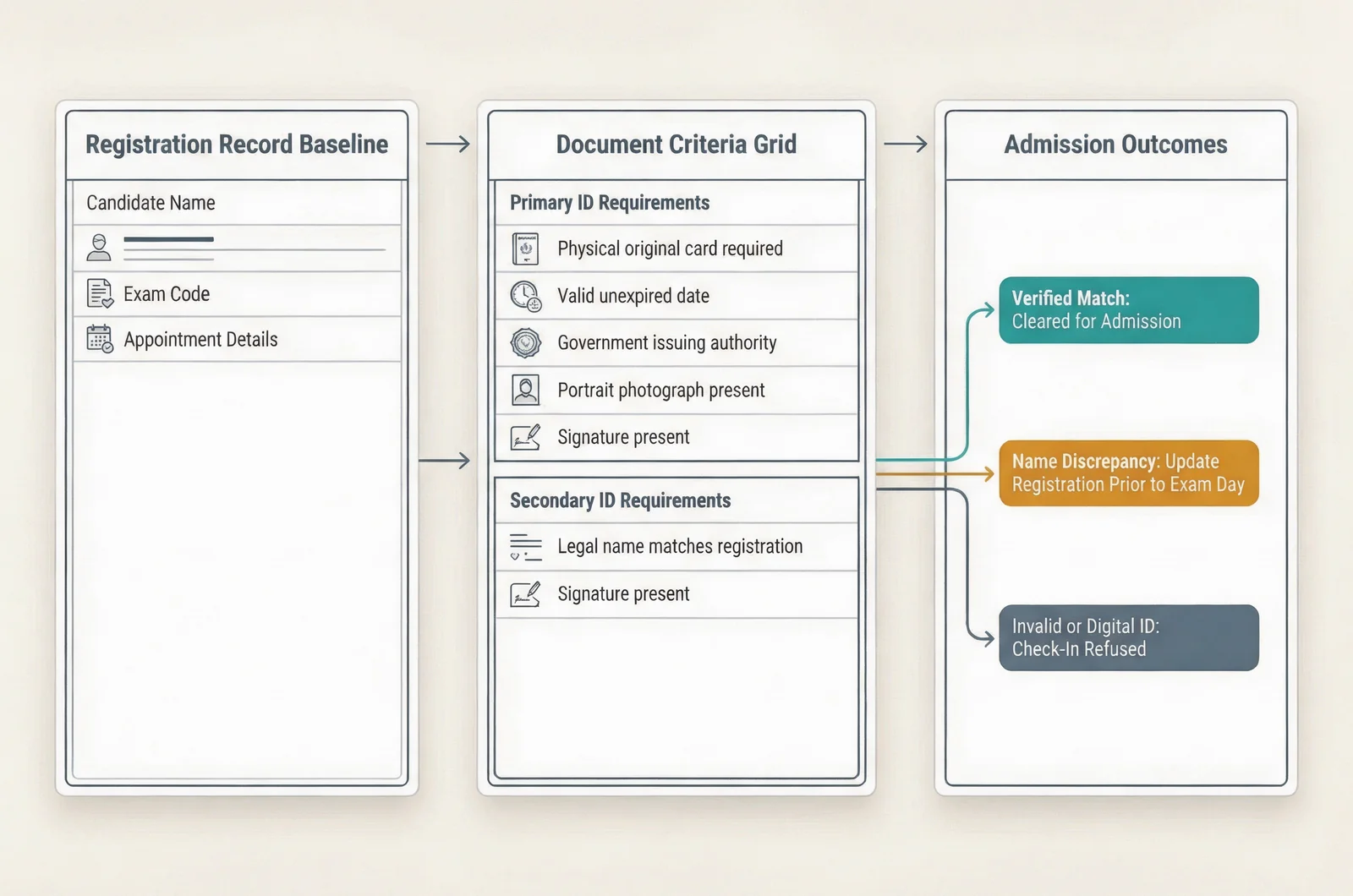
Compare the required documents with what you actually have
Read the ID requirements attached to your Cisco appointment. Establish the required number and combination of documents, then inspect each document against those conditions.
Check whether the policy requires:
- A photograph, signature, or particular issuing authority.
- Original physical documents.
- Documents that remain valid on the appointment date.
- Particular documents when testing outside the issuing country.
- An approved exception for your circumstances.
Do not assume that possessing a passport or driver’s license settles every requirement. Compare the actual document with the applicable conditions.
Likewise, do not treat a phone photograph, photocopy, digital credential, or renewal receipt as an accepted substitute unless the relevant policy explicitly permits it. Finding an image of your ID on your phone is not a reliable admission plan.
Lay out the required documents together. Read the names and validity dates rather than relying on memory.
Resolve differences before reaching the desk
Check how the appointment policy treats middle names, initials, hyphens, and name changes. Follow its matching standard; do not invent a stricter rule or assume that every difference is harmless.
For example, suppose your booking uses your married surname while your intended ID uses an earlier surname. Contact the designated support team and establish the accepted correction or documentation process. Do not assume that carrying an extra certificate automatically resolves the difference.
Explain the precise issue when asking for help. Include the appointment reference and describe the mismatch without sending sensitive document images through an unapproved channel.
A useful interactive appointment checklist would track the registered name, required documents, validity dates, and unresolved exceptions. It should keep an item marked unresolved until the candidate has checked the applicable requirement.
Complete this stage with the required documents ready and any exception confirmed through the appropriate support process.
Build your arrival window around admission
Plan to reach the admission desk by the arrival time specified for your appointment. Parking at that time may still leave you several minutes from the correct room.
Separate three points in your travel plan: reaching the building, finding the test center, and presenting yourself for check-in. Add time for parking, elevators, reception, and an unfamiliar entrance.
Record the actual arrival requirement from your confirmation. A recommendation remembered from a forum or another certification is not evidence of your appointment’s deadline.
If you are delayed, use the contact route in your confirmation as soon as possible. Give your appointment reference and expected arrival time. Ask what options remain.
Do not assume that calling preserves your appointment or exam fee. Admission, cancellation, and fee consequences depend on the applicable terms. Obtain a clear answer before making further arrangements.
Finish food, routine errands, and last-minute review before presenting yourself for admission. Avoid creating another task between reaching the building and finding the desk.
At reception, state that you have a Cisco exam appointment and have your confirmation details ready. The verification cue is simple: you are at the correct desk within the appointment’s required arrival window.
Clear personal items with the administrator
Ask the administrator what may enter the testing room and where everything else must go. This avoids making assumptions about an item simply because you use it every day.
Bring as little as practical. A bag full of study materials creates more things to sort out during admission.
Ask where to store your phone, watch, headphones, wallet, outerwear, and other belongings. Follow the instructions for switching off and storing electronic devices. Silence alone may not satisfy the direction you receive.
Keep study notes packed away once admission begins. Do not carry a handwritten subnetting sheet toward the workstation because you intend to discard it later.
Ask how drinking water, medication, medical devices, and other necessary items are handled. Where an item needs an accommodation or advance approval, settle that process before exam day. Identify any approval you have when you arrive.
Also establish whether you may access stored belongings during an authorized break. Having an item in a locker does not establish permission to use it while the exam session remains active.
Before entering the room, check your pockets and wrists as directed. Your expected result is a clear understanding of what accompanies you to the workstation and what stays stored.
Complete admission and read the NDA before accepting
Follow the administrator’s admission instructions in order, and ask about anything you do not understand before proceeding. Successful check-in means completing the required process, rather than merely handing over an ID.
Keep your documents available until staff tell you to store or retain them. Follow any identity-verification and security steps required for your appointment.
Ask how to request assistance once seated. You need to know the approved signal before a mouse problem, unclear instruction, or urgent issue occurs.
When presented with the nondisclosure agreement, or NDA, read the displayed terms and acceptance instructions. The agreement explains obligations concerning exam confidentiality. Avoid treating it as an ordinary screen to dismiss.
Check for any displayed acceptance deadline. Resolve a question promptly through the permitted assistance process rather than letting an agreement screen sit unanswered.
If you cannot accept the terms, ask about the consequences before proceeding. Do not assume that declining produces a refundable cancellation.
Finally, ask when you may use any supplied writing materials. Wait for the permitted point before writing formulas, commands, or remembered notes.
Move forward when the required agreement is complete, the administrator has authorized you to proceed, and you understand how to request help.
Read the interface before answering the first question
Use the on-screen instructions to establish how this CCNA sitting works. Familiarity with practice software helps with pacing, but the live exam’s instructions determine the available controls.
Before answering, identify:
- Where remaining time appears.
- How to select and submit an answer.
- How questions with multiple required responses are presented.
- Whether an answer can be changed before submission.
- Whether navigation permits returning to an earlier question.
- How to request help with a technical problem.
Read any instructions for interactive tasks before using the controls. Avoid spending your first encounter with a task guessing which action submits your work.
An Exam Dumpster timed attempt can help you practice working steadily under a clock. When you sit the actual exam, establish its navigation rules before relying on a familiar practice habit.
Pay particular attention before selecting a button that advances or submits. If the instructions make an action irreversible, check your response first. Do not build your pacing plan around returning later unless that function is explicitly available.
Report a workstation problem through the approved assistance process as soon as it appears. Describe the behavior precisely, such as an unresponsive control or unreadable display.
Begin answering once you understand the timer, submission controls, navigation limits, and assistance procedure.
Ask about breaks before you need one
Clarify the break procedure before starting so you can act correctly if you need to leave your seat. A bathroom visit raises questions about permission, timing, and access to belongings.
Ask whether breaks are available for your appointment and whether the exam clock continues during them. Also establish how to request a break and what you must do before returning.
Do not infer a scheduled break from the appointment’s overall length. The time shown in a booking may include activities beyond answering questions.
If you have approved accommodations, confirm that the arrangements recorded for your appointment match what you expect. Raise a discrepancy before the exam starts.
Use the restroom beforehand when practical. This reduces one avoidable interruption without requiring a change to your normal food, drink, or medication routine.
During the exam, request permission through the approved process before leaving your workstation. Follow the directions about where you may go and what you may access.
Return through the required admission procedure rather than walking directly back to your seat. Check the displayed time when you resume and adjust your pacing to the time remaining.
Report problems and complete checkout
Follow the displayed completion instructions and the administrator’s directions when your exam ends. Treat checkout as part of the appointment.
Before selecting a final submission control, read its confirmation message. Make sure you understand whether you are ending the session.
If a technical interruption affected your sitting, report it before leaving the center. Explain what happened and when, without speculating about its effect on your result. Ask whether an incident reference or further support action is available.
Establish how your result or score report will be provided. If it is not available at checkout, ask where to find it and which support route to use if it does not appear.
Return any supplied materials as directed, then collect your belongings. Check that you have your ID, phone, wallet, and other stored items before leaving.
Keep appointment records and any incident reference together. When discussing the experience afterward, keep the discussion to logistics, preparation, and general topic areas. Follow the confidentiality agreement you accepted concerning exam content.
Settle these CCNA admission questions before the appointment
How many IDs should I bring?
Bring the exact number and combination required by the current admission instructions for your Cisco appointment. This guide does not establish a verified count. Check requirements for photographs, signatures, originals, and validity together; counting documents alone does not confirm that the combination is acceptable.
What if my registered name differs from my ID?
Resolve the difference through the designated support process before traveling. Describe the specific discrepancy and ask whether the booking needs correction or an approved exception applies. Keep the response accessible. Do not assume that a verbal explanation at reception will satisfy the identity requirements.
Can I still sit the exam if I arrive late?
Do not plan around an assumed grace period. Contact the support route in your confirmation and ask about admission and fee consequences under your appointment’s terms. A test center’s ability to admit a late candidate is not established by another candidate’s experience.
Can I bring my own notes or writing pad?
Use only materials expressly permitted for the appointment. Ask what the center supplies and when you may begin writing. Keep personal study notes stored as directed. Permission to use supplied scratch materials does not establish permission to bring prepared notes into the testing room.
What should I fix first if something is wrong?
Prioritize anything that could prevent admission: an unresolved ID requirement, a name discrepancy, the wrong delivery method, or an unworkable arrival plan. Then check the applicable correction or rescheduling deadline. Resolve the administrative problem before spending the remaining evening on another practice session.
Plan the move from CCNA to CCNP
Open a free sample set for their exam code, then create a free account to unlock the rest and save progress Get started |  |