Best Digital SAT Score Calculator Tools Ranked for Accuracy
By ExamDumpster Editorial Team· (updated Oct 29, 2026)

A digital SAT scoring scale calculation guide should help you decide which estimate deserves your trust. Start by checking whether a tool identifies its practice-test inputs, explains its scoring assumptions, and shows how its estimates compare with official results. A precise-looking number needs evidence behind it.
The options below are ordered by the strength of their scoring evidence. Official Bluebook practice results provide the starting reference. Third-party calculators earn consideration through documented methods and validation. Individual commercial apps remain unranked here because app-specific accuracy measurements, current capabilities, and prices are unverified.
What makes a digital SAT calculator worth trusting
A useful digital SAT calculator connects the work you completed with an estimate you can interpret. Its explanation matters as much as its output.
Before accepting a result, look for these details:
- The specific practice test or question set the calculation supports.
- Separate inputs for Reading and Writing and Math.
- An explanation of how module information affects the estimate.
- Examples comparing estimates with official practice results.
- Clear limits on what the output can predict.
A calculator asking more questions may capture useful detail. That alone cannot establish accuracy. The method still needs support.
Validation also needs context. A calculator matching one practice result has demonstrated agreement on that example. A broader accuracy claim needs comparisons across different scores and answer patterns. Ideally, those comparisons include cases beyond the examples used to build the calculator.
Cost comes after that assessment. Check whether payment covers only an estimated score or also provides explanations, diagnostic feedback, and saved work. A subscription price cannot establish scoring quality.
Keep three records separate: what you answered correctly, the practice score reported for that attempt, and any prediction about a future test. Use the official practice report as the reference when checking a calculator’s reconstruction of that same attempt.
Four scoring options, ordered by their evidence
These four approaches fit different tasks. The order reflects how closely each can connect an estimate to a documented practice result. It does not assign measured accuracy percentages to individual products.
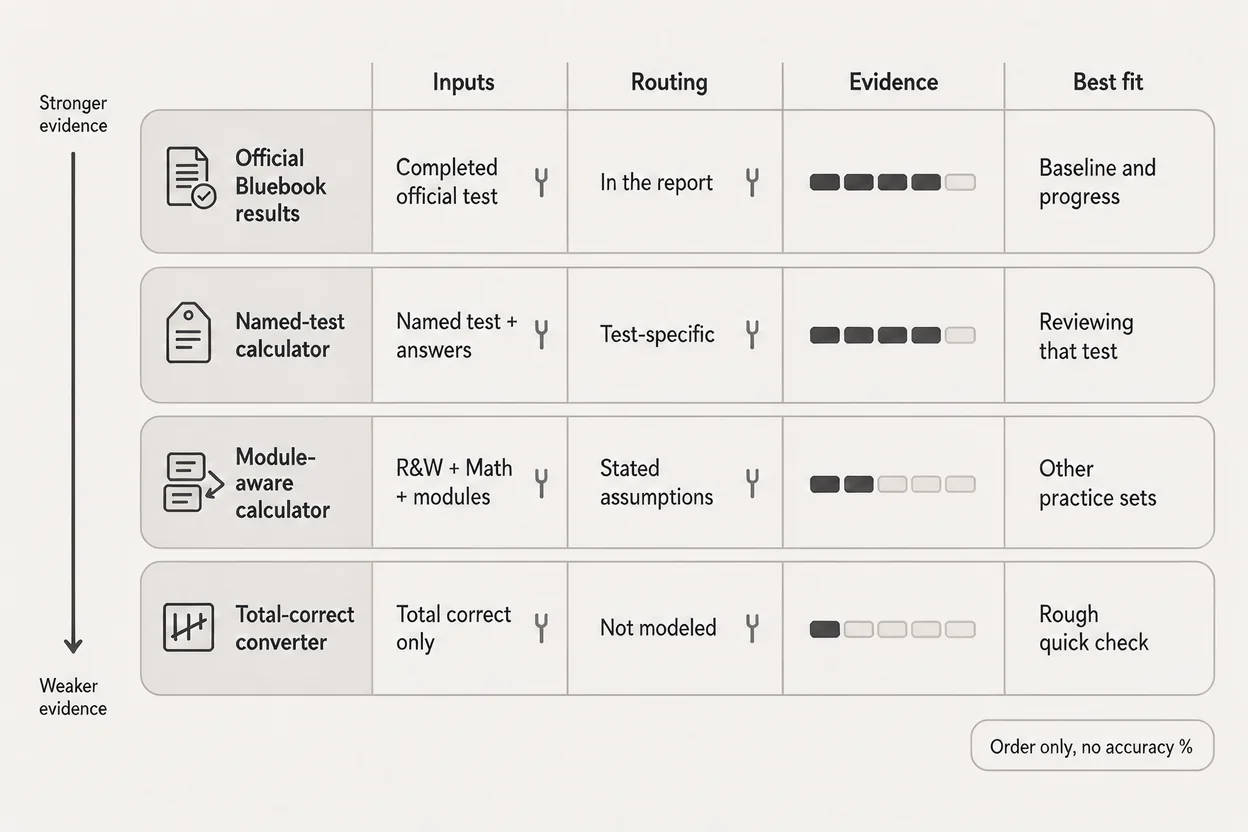
Official Bluebook practice results
Official Bluebook practice results are the strongest starting reference when you have completed an official practice test. They connect a particular attempt with its reported result.
This option best suits students establishing a baseline or checking whether their preparation is producing progress. Its main strength is the direct relationship between the practice assessment and its scoring report.
Use that report before entering your answers into another tool. Record the test identifier, section results, and testing conditions. Those details make later comparisons easier to interpret.
The limitation is prediction. A practice result describes one attempt. Familiar questions, interruptions, extra time, or fatigue can affect how well that attempt represents your usual performance.
Before paying another service to interpret the result, identify what additional information you need. An explanation of recurring errors may justify attention more readily than a second display of the same total.
For a completed official practice test, keep its reported score as your baseline. Evaluate outside estimates against that result.
A calculator matched to a named practice test
A test-specific calculator is worth considering when its documentation identifies the exact practice assessment it supports. That connection gives you something concrete to check.
This approach best suits students who want to reconstruct an estimate or explore a limited scenario for a particular test. Its potential strength is traceability: the input belongs to a named assessment rather than an unspecified collection of questions.
The evidence should explain where the conversion comes from. Published comparisons with corresponding official practice reports are more useful than an unsupported accuracy claim.
Its limitation is transferability. A method developed around one practice test needs separate support before you apply it to another. Similar-looking questions do not establish equivalent scoring.
If access costs money, inspect the methodology before purchasing. Check whether the calculator names supported tests, documents assumptions, and distinguishes estimates from reported scores.
Use a test-specific tool only within its documented scope. When your practice-test identifier does not match, set that estimate aside.
A module-aware calculator with documented assumptions
A module-aware calculator asks for performance details within each section instead of relying solely on one total-correct count. That structure can support a more informative estimate when the model is documented.
It best suits students exploring how different performance patterns might affect an estimate. Separate module inputs make those scenarios easier to describe.
The standout benefit is visibility. You can inspect which inputs changed and whether the result responds to them. However, a responsive interface does not demonstrate that the response matches official scoring.
Look for an explanation of routing assumptions and the treatment of question difficulty. A student’s judgment that a question felt hard cannot establish its official scoring characteristics.
The main limitation is calibration: the connection between the tool’s model and actual reported results. More detailed inputs cannot repair an unsupported conversion.
If this tool is part of a paid package, assess the scoring evidence separately from the surrounding lessons and design. Use its scenarios to frame study questions, and keep the official practice result alongside every estimate.
A total-correct score converter
A total-correct converter is the simplest option. It takes an answer count or percentage and translates that input into an estimated scaled score.
This approach best suits rough progress tracking within a consistent practice routine. Its strength is convenience. You can quickly record whether your accuracy improved on comparable work.
Its limitation is the information it leaves out. A single count cannot describe which questions you answered, how performance differed between modules, or which assumptions the conversion uses.
A conversion chart needs documentation just as an interactive calculator does. Check which assessment supports the chart and whether the conversion is intended for that assessment.
Convenience alone provides little reason to pay. If a converter adds no explanation, treat its scaled output cautiously and keep your original accuracy record.
Use simple counts to monitor comparable practice sets. For a meaningful scaled-score baseline, return to a scored practice assessment.
How to read the scoring scale without inventing a conversion
Digital SAT score calculation involves two different tasks: estimating scaled section results and combining those section results. The arithmetic is straightforward once valid section scores exist. Establishing those scores requires the scoring method.
Raw accuracy describes the work you completed
Your raw accuracy records how many answers were correct in a defined set. It can help identify whether you are improving on comparable questions.
A scaled score expresses performance on the assessment’s reporting scale. Multiplying a percentage by a maximum score does not establish a valid conversion.
For example, doing well on a short grammar drill tells you something about that skill. It cannot, by itself, produce a defensible estimate for an entire Reading and Writing section.
Keep percentages attached to their original context: the question set, timing conditions, and material covered. Preserve those details when you compare attempts.
Routing information needs a scoring model
The digital SAT uses multistage adaptive routing. A calculator claiming to simulate that structure needs an explanation of how module performance affects its estimate.
Routing and final scoring answer different questions. Knowing a route does not establish the final section score. The calculation still needs to account for performance within the assessment.
Be cautious about tools that turn a route label into a guaranteed score or apply an unexplained fixed penalty after each mistake. Those shortcuts need supporting evidence.
When a tool requests information you do not have, leave the scenario unresolved rather than inventing an input. A guessed route can make the output appear more certain than the underlying information allows.
Add section results after establishing their basis
Once you have reported section scores, adding them produces the total. A calculator should make that arithmetic easy to follow.
When section scores are estimates, their combined total remains an estimate. Correct addition cannot validate the conversions that produced its inputs.
Record the section results alongside the total so you can inspect all three values.
Check the estimate against a practice result
The most useful calculator check compares its output with the official result for the same practice attempt. Keep the assessment and inputs fixed throughout the comparison.
Record the attempt before changing inputs
Start with a completed practice test and its report. Record:
- The practice-test identifier.
- The reported Reading and Writing score.
- The reported Math score.
- The calculator inputs and output.
- Any uncertain input or departure from normal testing conditions.
Use answer and module details available in your review. Avoid supplying guessed difficulty labels or inferred scoring parameters.
If a calculator does not support your test, the comparison has a scope problem before any arithmetic begins. Choose a supported assessment or stop using that tool to interpret the attempt.
Check section differences as well as the total
Consider a hypothetical example. An official practice report shows Reading and Writing at 650 and Math at 710. The total is 1,360.
A calculator estimates 670 for Reading and Writing and 690 for Math. Its total is also 1,360.
The matching total hides two differences: the Reading and Writing estimate is 20 points higher, while the Math estimate is 20 points lower. Those differences matter if you use the calculator to decide which section needs more preparation.
Define each difference consistently as the calculator estimate minus the corresponding reported score. Compare both sections before judging the total.
One matching attempt remains one example. If you use additional completed tests, keep their identifiers and results separate.
A useful interactive checker would accept the official and estimated section scores, calculate each difference, and flag uncertain inputs. It would help students inspect agreement without pretending to reproduce undisclosed scoring parameters.
Use calculator results to choose your next study task
A digital SAT estimate becomes useful when it leads to a specific preparation decision. The score should point you back to the work behind it.
Review the questions you missed and separate content gaps from execution problems. A misunderstood algebra concept needs different practice from a correct method abandoned under time pressure.
Choose a task you can complete and review:
- Rework a missed problem without the explanation visible.
- Explain why each incorrect answer choice fails.
- Complete a short timed set on a recurring weak skill.
- Compare the same skill across later practice attempts.
Avoid spending a study session adjusting calculator sliders until the displayed score reaches your target. Change an input only when you can connect it to a realistic improvement in performance.
If you are also considering the ACT, Exam Dumpster’s ACT sample questions provide a separate practice context. Keep those results separate from SAT calculator inputs.
Your study record should preserve what you practiced, what went wrong, and what you could do correctly afterward. Use a later scored practice attempt to assess whether that work changed your broader performance.
Questions students ask about score estimates
Digital SAT calculator questions usually concern precision, cost, or conflicting results. Resolve those issues before using an estimate to change your preparation plan.
Does every wrong answer cost the same number of points?
A fixed points-per-error rule needs evidence for the assessment it describes. Treat a universal subtraction rule cautiously, especially when the tool provides no explanation of routing or scoring assumptions.
Use the practice report to interpret a completed attempt. Review individual errors to decide what to study.
Does a harder second module establish my final score?
Module route alone cannot establish a final score. A tool needs a supported method connecting performance across the assessment with its reported scale.
Keep the route, answer pattern, and final result distinct in your records.
Is a paid calculator more accurate than a free one?
Price does not demonstrate accuracy. Compare the documented method, supported tests, validation examples, and limitations.
A paid package may contain useful teaching material. Assess that material separately from the evidence supporting its score estimate.
Should I average several calculators when they disagree?
Averaging can conceal different assumptions or shared weaknesses. First check whether the tools support the same test and use equivalent inputs.
For an attempt with an official practice report, compare each estimate with that report instead of averaging the estimates together.
Can a calculator predict my exact test-day score?
An estimate cannot establish an exact future result. Its usefulness depends on the quality of its model and how closely your practice conditions represent your preparation.
Choose tools that explain their scope. Then use your latest scored practice attempt and error review to select the next study task.
ACT preparation and score reporting
Open a free sample set for their exam code, then create a free account to unlock the rest and save progress Get started |  |