AWS Exam Reschedule Policy vs Cancellation: Refund Rules Compared
By ExamDumpster Editorial Team· (updated Oct 20, 2026)

The AWS exam cancellation and reschedule policy gives you two ways to change your plans: move the appointment or cancel the booking. For a standard appointment, both actions must be completed before the 24-hour cutoff to avoid losing the exam fee. Rescheduling suits candidates who still intend to test and can choose another date. Cancellation suits candidates who need to release the booking and, where eligible, receive a refund.
Your payment method changes the financial outcome. A cash payment, employer-funded voucher, and promotional discount can have different consequences. Start with the deadline, then compare what each action preserves.
Both choices depend on the 24-hour cutoff
AWS permits standard appointment cancellations and reschedules up to 24 hours before the scheduled exam without an additional change fee. Once that window closes, ordinary cancellation and rescheduling options are no longer available.
Treat this as an elapsed-time deadline. “The day before” can be too late if you overlook the appointment’s start time.
For a hypothetical Thursday appointment at 3 p.m., the 24-hour point is Wednesday at 3 p.m. in the appointment’s stated time zone. Waiting until Wednesday evening would put you inside the restricted window.
Check the date, time, and time zone in your booking confirmation. This matters when you travel or use a calendar that automatically converts appointments to local time.
Give yourself a buffer to complete the change. You may need to recover an account password, compare available appointments, or resolve an error. Opening the scheduling page before the deadline does not establish that a change succeeded.
A useful deadline calculator would accept the appointment time and time zone, then display the 24-hour cutoff and an earlier personal reminder. It should keep refund eligibility separate, since payment and voucher terms require their own checks.
What changes when you reschedule or cancel
The practical comparison is between keeping a paid appointment, releasing it, and allowing it to pass unused. Those outcomes affect your money and your ability to choose another date.
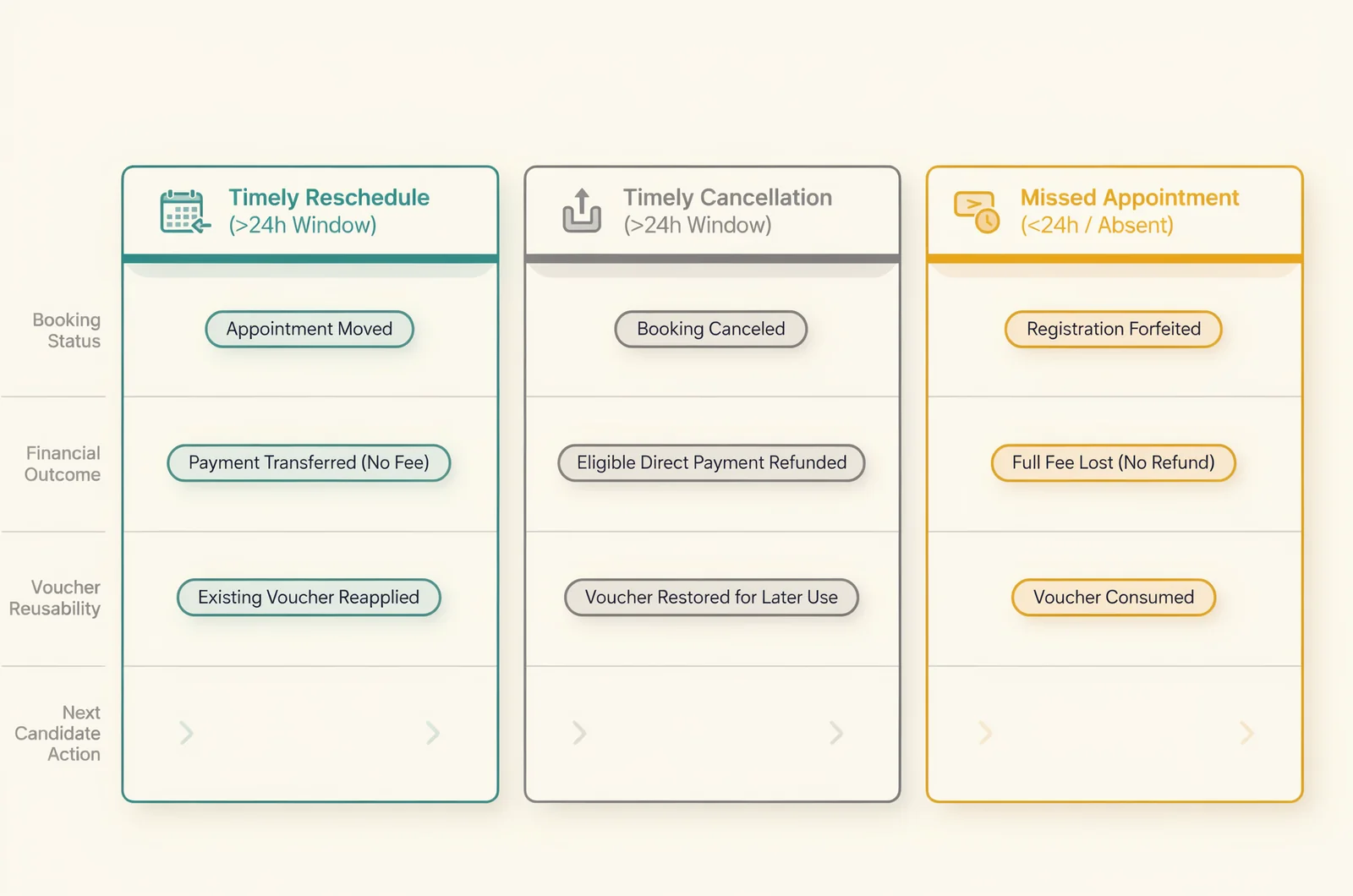
| Action | Appointment outcome | Financial outcome | Best fit |
|---|---|---|---|
| Reschedule before the cutoff | Moves the booking to an available date | Exam payment remains attached to the booking | You still plan to test soon |
| Cancel before the cutoff | Releases the appointment | Eligible payment is refunded under its terms; voucher rules remain relevant | You cannot choose a realistic replacement date |
| Miss the appointment | Leaves the scheduled exam unused | Exam fee is normally forfeited | An outcome to avoid when a timely change remains possible |
Rescheduling preserves an exam appointment
Rescheduling changes when you take the exam. It generally keeps your registration payment committed to that booking rather than returning it to you.
This is the more direct choice when a work shift changes or you need a defined period of additional preparation. Its limitation is availability: your preferred replacement date must exist in the scheduling system.
Check the permitted change allowance before relying on repeated moves. If the system requires cancellation and a new booking, review the payment consequences before proceeding.
Cancellation releases the booking
A timely, eligible cancellation allows a refund of the exam fee under the payment terms. It also removes your existing appointment.
That makes cancellation useful when your plans are uncertain or you need the money back. Its limitation is the separate booking you will need later. Your old time slot is no longer reserved, and a future appointment depends on availability and the terms in effect when you book.
Missing the appointment puts the fee at risk
A no-show normally means forfeiting the exam fee and paying for another booking. It does not move your appointment automatically.
If you already know you cannot attend, complete an available change before the cutoff. Keep the confirmation that records the result.
Cash payments, vouchers, and discounts have different outcomes
Cancellation can produce different results depending on how you paid. Before choosing it over rescheduling, identify which part of the registration came from your money and which part came from a code or benefit.
Card payments and other direct payments
For a standard eligible booking paid directly, cancellation before the deadline generally allows the exam fee to be refunded. Check the cancellation receipt for the amount and payment destination.
Use your original receipt when estimating the refund. A published list price may differ from your actual charge because of a discount, taxes, or currency conversion. The amount you paid is the useful starting point.
The guide to AWS certification exam costs can help with budgeting for a replacement booking. Your transaction receipt establishes what you paid for the appointment being canceled.
Keep exam registration separate from preparation spending. Canceling an appointment does not automatically cancel a separate course, practice-test purchase, or subscription. Review those purchases individually if your study plans have changed.
If someone else paid, establish where the refund will go before treating it as money available for your next booking.
Exam vouchers and employer-funded bookings
A voucher represents eligibility to pay for an exam under particular terms. Canceling a voucher-funded appointment does not turn its value into a cash refund to you.
Before releasing the booking, establish whether the voucher can be reused and whether it will remain valid for your intended replacement appointment. Cancellation alone does not establish that either condition is satisfied.
Check:
- The voucher’s expiration date.
- Which exam or exam level it covers.
- Any conditions governing reuse after cancellation.
- Whether the voucher issuer must resolve a reuse problem.
An employer-funded voucher may also have an internal deadline tied to reimbursement or a training program. Keep that requirement alongside the exam provider’s terms.
Discount codes and promotional benefits
A discounted booking raises two separate questions: what happens to the amount you paid, and what happens to the discount.
An eligible cash refund does not establish that a promotional code will work again. Likewise, a successful reschedule does not automatically extend an expiring benefit.
Check the promotion’s cancellation and validity conditions before surrendering a booking that already has the discount applied.
Choose a date that your study schedule can support
Rescheduling usually makes sense when the obstacle is temporary and your preparation still has a clear endpoint. Cancellation becomes more practical when you cannot identify a date you can reasonably keep.
Move the appointment when the delay has a purpose
A replacement date should solve a specific problem. Perhaps you need to finish a domain review, complete hands-on exercises, or work around a confirmed shift change.
Choose the date by working backward from the remaining tasks. Count the study sessions you can actually complete between work and other commitments. An extra week with no available study time will not address a preparation gap.
Rescheduling also keeps an exam commitment on your calendar. That can help when you still want the certification and have enough information to plan the remaining work.
Before confirming, check that the new appointment satisfies any voucher, promotion, or employer deadline attached to the booking.
Cancel when the replacement date would be a guess
Cancellation can be the clearer choice when your availability is unknown, your certification goal has changed, or the exam payment needs to return to your budget.
It also avoids selecting an arbitrary date simply to keep the booking alive. Repeatedly moving an appointment adds administrative work and creates another deadline to monitor.
However, cancellation can sacrifice a useful time slot or complicate a promotional booking. Compare those costs with the benefit of releasing the appointment.
If you intend to book again, write down the condition that will make you ready: a stable work schedule, completion of a study block, or resolution of a voucher question.
Use readiness evidence to judge a preparation delay
Separate a scheduling conflict from a knowledge gap. A shift change may require a different appointment time; weak performance across several exam domains may require a different preparation plan.
Review unfamiliar practice questions under timed conditions. Look at the explanations for both correct and incorrect choices, then identify the topics behind repeated errors.
If you already study with Exam Dumpster, its timed mode, answer explanations, and saved attempts can support that review. Practice results are preparation signals, and they do not guarantee an exam result.
Choose a replacement date that leaves room to address the gaps you identified.
Finish the change in your exam account
An AWS appointment change is complete when the booking record reflects the result. Follow the appointment-management route from your AWS Certification account to the associated Pearson VUE booking.
Review the appointment before selecting an action
Use this sequence to reduce avoidable errors:
- Sign in to the AWS Certification account associated with the booking.
- Open the exam-management area and locate the appointment.
- Confirm the exam name, date, start time, time zone, and delivery format.
- Review the available rescheduling or cancellation action.
- Read the payment or voucher information presented before confirming.
- Complete the action and retain the resulting confirmation.
For rescheduling, inspect the replacement appointment carefully. A nearby date can have a different start time or testing location.
For cancellation, check that the final screen records a canceled appointment. Review any refund information separately from the appointment status.
Check the confirmation against your calendar and receipt
After rescheduling, compare the confirmation with your intended date, time zone, location, and exam. Then update your calendar and study reminders.
After canceling, retain the cancellation record with the original payment receipt. Together, those records make it easier to explain a refund discrepancy or voucher problem.
A confirmation email and the account’s appointment status should describe the same outcome. If they conflict, contact support while the details are available.
Save any error message you receive during the process, particularly if the deadline is approaching. Record when the error occurred and what action you attempted.
For a successful reschedule, set a new reminder ahead of the replacement appointment’s cutoff. For a cancellation, record any stated refund-processing window so you know when to follow up.
Late cancellations and exam-day problems need separate handling
Inside the 24-hour window, plan around the standard restriction on changes. Do not assume that sending a support request automatically cancels the appointment or protects the payment.
If an emergency prevents attendance, contact the exam delivery provider promptly and explain the circumstances. Any exception depends on the applicable process and the provider’s decision. A request alone does not establish refund eligibility.
An exam-day delivery problem needs a clear record too. If a test center cannot deliver the appointment or an online session fails, follow the provider’s support instructions and retain the case number.
Describe what happened accurately. Include the appointment details, the time of the problem, and any relevant error messages. Distinguish a provider cancellation from a change you initiated yourself.
Ask for the resulting appointment and payment status in writing. A case may need to establish whether the booking will be replaced, refunded, or handled another way.
Until you receive that decision, avoid treating the issue as an approved free rebooking. If you must make another appointment urgently, check how a separate payment could affect the unresolved case.
Refund and rebooking questions worth settling
Several practical questions can determine whether cancellation or rescheduling is the better choice for your booking.
Will canceling always return the full advertised exam price?
An eligible cancellation concerns the payment made for your booking. Start with the original receipt rather than the advertised price.
A discount can reduce the amount paid, while a voucher-funded appointment involves different terms. Compare the cancellation record with the actual transaction, and investigate any unexplained difference through the provider’s support process.
Does rescheduling produce a refund?
Rescheduling ordinarily keeps the payment attached to the appointment. Its purpose is to move the exam to another available time.
If your immediate goal is to recover a direct payment, review cancellation eligibility. Check the refund destination and payment terms before confirming, particularly when an employer or another person paid for the booking.
Does cancellation protect a voucher until I am ready?
Cancellation does not itself extend a voucher’s expiration date. Establish whether the code remains reusable and valid for the replacement exam.
If the expiration date is close, resolve that question before canceling. A successful cancellation and a successful future voucher redemption are separate outcomes.
Can I change from online testing to a test center?
Do not assume that changing the appointment date also changes its delivery format. Review the options available for your specific booking.
If switching formats requires cancellation and a new appointment, check the refund or voucher consequences first. Confirm the format, location, date, and time on the replacement booking before completing it.
What should I do if the refund has not arrived?
Check the processing information provided with the cancellation, then compare the stated window with your payment records.
If that window has passed, contact support with the original receipt, cancellation confirmation, appointment identifier, and refund amount in question. For an employer-funded booking, include the person or team that controls the original payment method.
Prepare for the AWS appointment you keep
- SAA-C03 timed practice and answer review
- AIF-C01 sample questions by difficulty
- AWS Certification Exam Costs
Open a free sample set for their exam code, then create a free account to unlock the rest and save progress Get started |  |